Trusted by teams at






ZeroTrace is a cybersecurity services website template built with Webflow. It presents cloud security, network security, data security, threat detection, and incident response services.
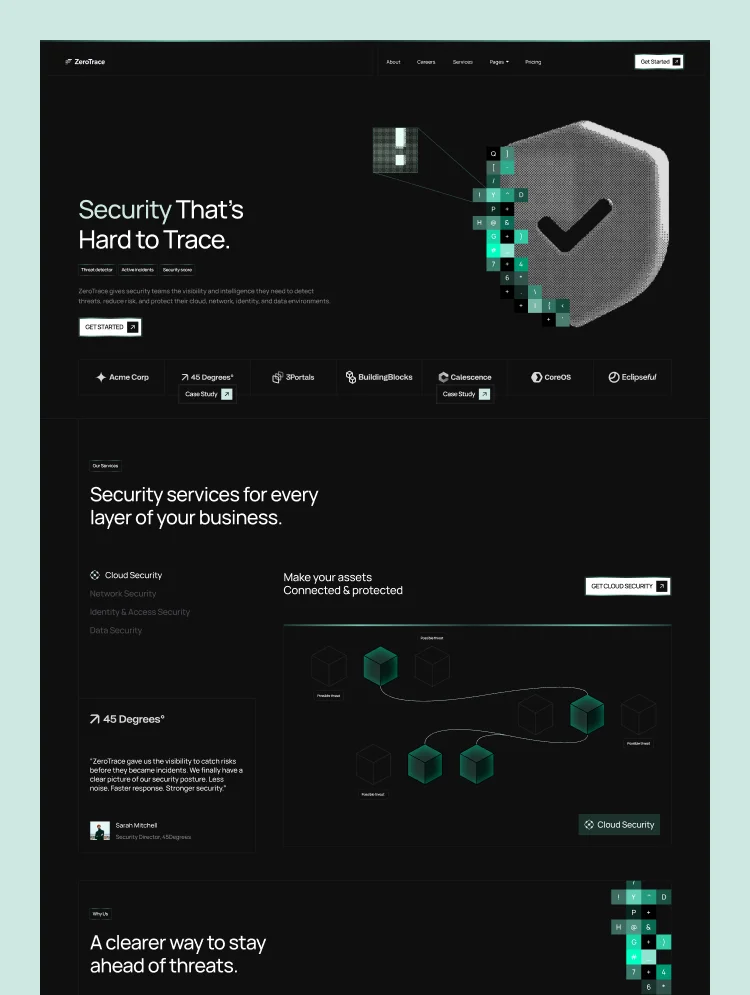
ZeroTrace is a modern cybersecurity website template built on Webflow for security companies that need to look as dependable as the protection they sell. A dark interface, a threat-dashboard hero, and data-led sections present cloud security, network security, and data security services with clarity.
The template covers eight service areas through CMS-driven service pages, from identity and access management and AI security to compliance and risk. Outcome-led case studies, team profiles, and a full FAQ page help security providers answer buyer questions before the first call.
Three homepage layouts target different buyers: a focused single-offer provider, a firm serving multiple industries, and an enterprise security company. Pricing plans with a monthly and yearly toggle, careers listings, and a blog make this cyber security Webflow template a complete site for growing security businesses.
Best for: This cybersecurity website template is best for security companies of every size. It is perfect for managed security service providers MSSPs), cybersecurity consulting firms, penetration testing and vulnerability assessment teams, cloud security specialists, SOC and incident response providers, compliance and risk advisors, IT security agencies, and B2B security startups.
This template has a total of 29 pages, including 15 static pages, 6 CMS collection pages, and 8 utility pages. It provides 3 homepage layouts, 3 about layouts, and 3 contact layouts, plus dedicated pages for services, case studies, pricing, careers, blog, and frequently asked questions.
Each page supports a real step in the security buying journey. Service details explain the challenge, what is protected, and how the engagement works. Case study pages walk through challenge, approach, solution, and measurable results. Pricing Single pages break down each plan, Team Details pages introduce the security experts, and Careers Details pages help firms hire engineers, analysts, and consultants.
This cybersecurity Webflow template is built around how security services are bought: buyers want proof, clarity, and a fast route to an expert. Outcome-led case studies, security metrics, client testimonials, and a five-topic FAQ give providers the evidence that enterprise and mid-market buyers look for.
Its three homepage layouts are designed for different audiences, so one template can position a specialist provider, a multi-industry firm, or an enterprise cybersecurity company. Transparent pricing plans, a careers hub, and a security blog help growing teams win clients, hire talent, and build authority.
Threat-Dashboard Design
A dark, technical interface with live-style security UI cards (threat detector, active incidents, security score) that signals expertise on first view and keeps visitors engaged.
Mobile Responsive
Layouts are styled for desktop, tablet, and both mobile breakpoints, plus large 1440px and 1920px screens, so security buyers get a clean experience on any device.
GSAP Motion & Smooth Scroll
Scroll-triggered text reveals, scramble-text effects, and smooth scrolling add a polished, high-tech feel. Every interaction is documented on the Instructions page.
Three Audience-Specific Homepages
Home V1 suits a focused single-offer provider, Home V2 a firm serving multiple industries, and Home V3 an enterprise security company. Pick the closest match and launch faster.
Built in Webflow CMS
Six CMS collections manage services, case studies, blog posts, careers, team members, and pricing plans. Add a new service or role without touching code.
SEO-Ready Structure
Every page ships with its own meta title and description, one H1 heading, and clean slugs such as /services and /case-studies, giving buyers a solid base for organic search.
STATIC PAGES · 15
CMS COLLECTION PAGES · 6
UTILITY PAGES · 8
Can only be used by you or one client for one end product. You cannot resell or redistribute this template in its original or modified state.
This template is free to use in both person and commercial projects. You cannot resell, redistribute, or license this template in its original or modified state.
Questions about this template? Just reach out to the template designer and they will get back to you within 2 business days.
For advanced design guidance, please share your questions in the Webflow Forum or reach out to a Webflow Partner.
Share your feedback by leaving a comment below.
For template support, please check the Support tab.

Use the Preview in Designer option to make any edits to the template pages and preview how the layout would fit your content. Changes in preview mode won't be saved.
It isn't possible to apply a template to an already existing project. Instead, you'll need to create a new project based on the Template.
With a Core plan (or higher), you can export sites you build in Webflow, including templates, to host them anywhere you'd like.
Webflow templates are only available for purchase through Workspaces and legacy individual accounts.
CMS templates are designed to use the power of the Webflow CMS. It is possible to downgrade to a Basic Site Plan as long as all CMS content is deleted from the project.
Use the View Connections tool to understand where the CMS content is on the site and delete any dynamic listings and CMS content. We also recommend you to check Components and the Collection page Templates.
Ecommerce templates are designed to use the power of Webflow Ecommerce. It is not possible to remove Ecommerce from a template, however, deleting all Ecommerce Products and Categories from the project, will allow to select a lower Site Plan.
Membership templates are designed to use the power of Webflow Membership. It is not possible to remove Memberships from a template.
.svg)


Comes with GSAP animations and interactions for additional polish and usability.
Reposition and resize items anywhere within the grid to produce powerful, responsive layouts — faster and without code.
Build your lead lists and subscriber base with beautiful forms.
Comes with animations and interactions for additional polish and usability.