Trusted by teams at


Waymark is a Webflow template for guided walking companies: three homepages, route pages with day-by-day tables and elevation profiles, regions, guides, journal and enquiry form, built with CMS collections, Client-First and 45 Interactions.
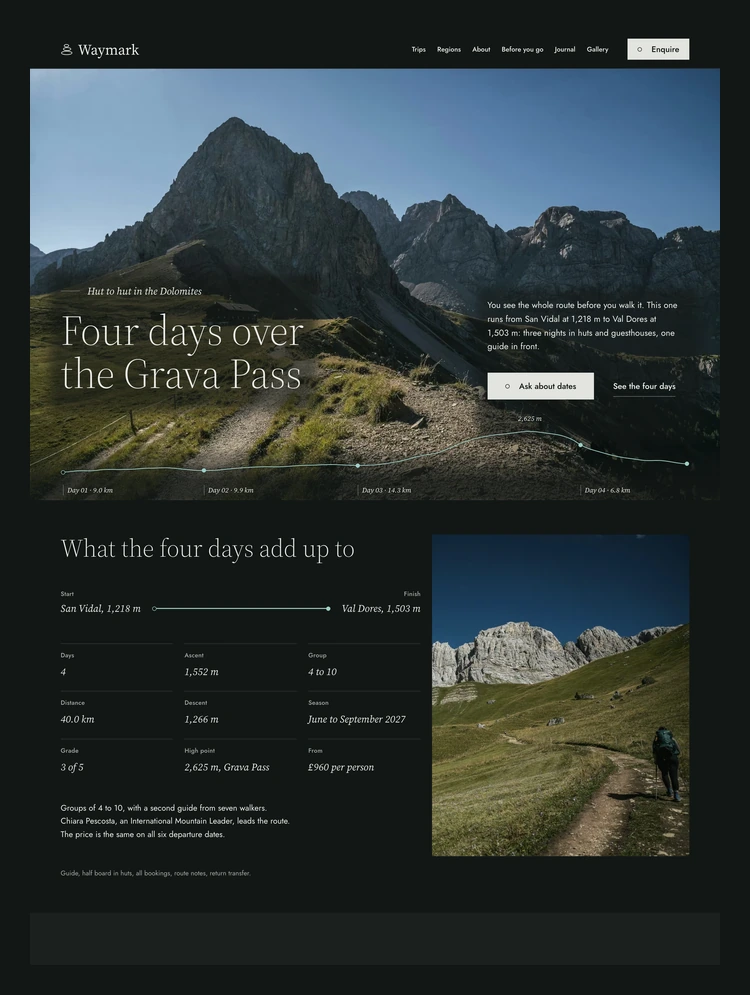
Waymark is a Webflow template for companies that lead guided walks, treks and hut-to-hut routes. The demo is Waymark itself, a small firm in Kendal that has led walks between Alpine huts since 2014: six routes of three to seven days in the Dolomites, the Stubai and Ötztal valleys and the Julian Alps, with every day published in kilometres and metres. Each page is written as that firm's real website, with route numbers, named guides, prices and departure dates, so you can replace the content section by section and keep the structure.
Waymark ships with three homepages that share the same type, colour, grid and components. Home A follows one four-day route from start to finish: the whole line on a map, a day-by-day section with a grade chart, the three nights, the five other routes and a booking form with departure date tiles. Home B is built around the season: it lists the twenty-three departures of summer 2027 in a table with a month filter, the price and the places left on each date. Home C opens on three photographic panels, one for each region, and goes on to a section per region with its routes, best months and the airport to fly into.
Six CMS collections carry the content that changes most: Trips, Regions, Articles, Guides, Days and Departures. Trips, Regions and Articles each have a collection page, and the Trips page has a region filter. A trip page opens on a strip of facts (start, finish, nights, days, distance, grade, ascent, descent, high point, group size, season and price), then shows the day-by-day table with distance, ascent, descent and the night for each day, a drawn route line and elevation profile, the guide who leads it and the 2027 departures with the places left. A new walk is one new item in Trips, with its days in Days and its dates in Departures. Its page builds from them; the route cards on the Home pages, Trips and Regions are static elements, so you add a card there by duplicating one.
The Regions pages describe each area, the best months, where to fly into and where you sleep. The About page presents the five guides and how a group is led. Every collection has descriptive field names and help text.
Before you go is a long page with a contents rail and eight sections: grades, getting fit, kit, huts, insurance, getting to the start, booking and cancelling, and questions. The five grades are explained from the numbers of each day, and the questions use Webflow's own Dropdown. Enquire holds a form with route, preferred departure, number of walkers, name, email, optional phone and a note about the walking you do at home, with its own success and error messages. The Journal has five articles written by the guides, with a category filter, and the Gallery shows photographs from the six routes with captions that name the hut, pass or village, filtered by region, and each photograph in the grid opens in Webflow's Lightbox. There is also a 404 page and a 401 password page.
The build follows Client-First by Finsweet: page wrapper, main wrapper, padding global, container and section padding classes, custom classes named by component and element, combo classes with an is prefix, and utility classes for spacing and text. A buyer who knows Client-First can find their way in the Navigator at once, and one who does not can learn it from the Style Guide page.
Colours, type and layout live in Webflow Variables. Raw colours feed a collection of colour schemes with two modes: a dark spruce ground and a light fog ground, so a section changes its colours with one class. Heading sizes are variables with their own values for Tablet, Mobile Landscape and Mobile Portrait. The type is Source Serif 4 for headings and Jost for text and interface, both uploaded as variable fonts under the SIL Open Font License. The route line and a set of drawings made for the template are SVG files, so you can replace them in the Assets panel.
The template has 45 Interactions, all native Webflow Interactions that run on GSAP, and each one is listed by name with its trigger and what it moves in the Element map on the Instructions page. Route lines draw in as they scroll into view, stations step on when you hover a button, the day rail follows the page and the questions open with a rise. Interactions animate only transform and opacity (a few set a class or a colour at once, and the Instructions page says which), and for a visitor who asks for reduced motion the elements stand in their final place, except the progress line of the Before you go contents rail. The Instructions page also explains how to change the key values and how to remove one animation or all of them.
Sixteen pages and three collection pages: Home A, Home B and Home C, Trips, Regions, About, Before you go, Journal, Gallery, Enquire, 404, 401, the trip, region and article pages, and four service pages (Style Guide, Instructions, Licenses and Changelog). The photographs are one hundred placeholders from Unsplash, listed with their authors on the Licenses page. The company, people, address, phone number and prices are invented for the demo.
Can only be used by you or one client for one end product. You cannot resell or redistribute this template in its original or modified state.
This template is free to use in both person and commercial projects. You cannot resell, redistribute, or license this template in its original or modified state.
Questions about this template? Just reach out to the template designer and they will get back to you within 2 business days.
For advanced design guidance, please share your questions in the Webflow Forum or reach out to a Webflow Partner.
Share your feedback by leaving a comment below.
For template support, please check the Support tab.

Use the Preview in Designer option to make any edits to the template pages and preview how the layout would fit your content. Changes in preview mode won't be saved.
It isn't possible to apply a template to an already existing project. Instead, you'll need to create a new project based on the Template.
With a Core plan (or higher), you can export sites you build in Webflow, including templates, to host them anywhere you'd like.
Webflow templates are only available for purchase through Workspaces and legacy individual accounts.
CMS templates are designed to use the power of the Webflow CMS. It is possible to downgrade to a Basic Site Plan as long as all CMS content is deleted from the project.
Use the View Connections tool to understand where the CMS content is on the site and delete any dynamic listings and CMS content. We also recommend you to check Components and the Collection page Templates.
Ecommerce templates are designed to use the power of Webflow Ecommerce. It is not possible to remove Ecommerce from a template, however, deleting all Ecommerce Products and Categories from the project, will allow to select a lower Site Plan.
Membership templates are designed to use the power of Webflow Membership. It is not possible to remove Memberships from a template.


Reposition and resize items anywhere within the grid to produce powerful, responsive layouts — faster and without code.
Build your lead lists and subscriber base with beautiful forms.
Comes with animations and interactions for additional polish and usability.