Trusted by teams at


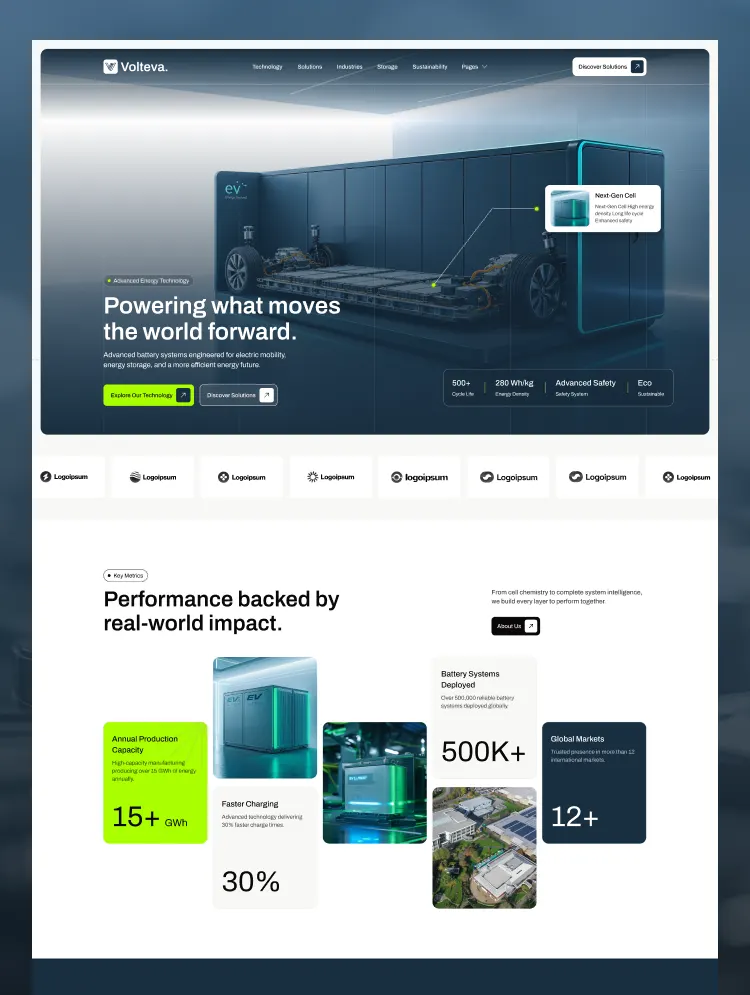
A high-tech Webflow template designed for electric vehicles, battery technology, and energy storage companies. Fully customizable, CMS-driven, responsive, and SEO-optimized to build trust and attract clients.
Volteva is a modern, premium Webflow template designed for electric vehicle (EV) manufacturers, battery technology companies, energy storage providers, clean energy startups, sustainable mobility firms, and industrial tech enterprises. Featuring a high-tech visual aesthetic, dark-mode hero design, clean layout hierarchy, and conversion-focused structure, Volteva helps you present complex battery engineering, showcase energy solutions, build industry credibility, and attract B2B partners and clients.
👉 Electric Vehicle (EV) Manufacturers & Suppliers
👉 Advanced Battery & Cell Technology Companies
👉 Energy Storage Systems (ESS) Providers
👉 Clean Energy & Renewable Technology Startups
👉 Smart Grid & Electric Mobility Solution Providers
👉 Automotive Engineering & Hardware Firms
👉 Industrial Power & Cleantech Enterprises
👉 Sustainability & Zero-Emission Technology Companies
Key Features:
⚡ High-Tech & B2B Conversion Design: Engineered specifically for the EV and battery storage industry to clearly communicate technical metrics, performance impact, and industry solutions.
🎨 Fully Customizable Visual System: Easily update colors, custom typography, section layouts, and interactive components via Webflow’s visual designer.
✨ Sleek Micro-Interactions & Animations: Polished animations and subtle hover effects bring hardware details, cell chemistry stats, and technology layers to life.
📱 100% Responsive & Retina Ready: Flawless visual delivery across desktop monitors, laptops, tablets, and mobile smartphones.
🧩 CMS Dynamic Content: Effortlessly publish and update Solutions, Technology Breakdown, Case Studies, Industry Insights/Blogs, and Team profiles through Webflow CMS.
🚀 SEO & Performance Driven: Clean DOM structure, fast loading times, accessible semantic structure, and search-engine-ready site architecture.
🎥 Step-by-Step Video Documentation: Guided video walkthroughs ensure effortless setup, editing, and deployment without touching code.
🎯 Global Style Guide: Pre-configured design tokens (colors, typography scales, container structures, buttons, and badges) for effortless site-wide consistency.
👉 Home
👉 About Us
👉 Blog
👉 Blog Details
👉 Project
👉 Project Details
👉 Team Member
👉 Team Member Details
👉 Technology
👉 Battery Solutions
👉 Research Innovation
👉 Sustainability
👉 Energy Storage
👉 EV Solutions
👉 Industries
👉 Contact Us
👉 Privacy Policy
👉 Terms Conditions
👉Instructions
Utility Pages:
👉 Style Guide
👉 Instructions
👉 Licensing
👉 Changelog
👉 404 Page
👉 Password Protected
📧 Support Email: flowzaiofficial@gmail.com (We typically respond within 24–48 hours)
📹 Video Documentation: https://ln.run/HHNYv
🌐 More Templates: Explore more premium Webflow templates from Flowzai
Can only be used by you or one client for one end product. You cannot resell or redistribute this template in its original or modified state.
This template is free to use in both person and commercial projects. You cannot resell, redistribute, or license this template in its original or modified state.
Questions about this template? Just reach out to the template designer and they will get back to you within 2 business days.
For advanced design guidance, please share your questions in the Webflow Forum or reach out to a Webflow Partner.
Share your feedback by leaving a comment below.
For template support, please check the Support tab.

Use the Preview in Designer option to make any edits to the template pages and preview how the layout would fit your content. Changes in preview mode won't be saved.
It isn't possible to apply a template to an already existing project. Instead, you'll need to create a new project based on the Template.
With a Core plan (or higher), you can export sites you build in Webflow, including templates, to host them anywhere you'd like.
Webflow templates are only available for purchase through Workspaces and legacy individual accounts.
CMS templates are designed to use the power of the Webflow CMS. It is possible to downgrade to a Basic Site Plan as long as all CMS content is deleted from the project.
Use the View Connections tool to understand where the CMS content is on the site and delete any dynamic listings and CMS content. We also recommend you to check Components and the Collection page Templates.
Ecommerce templates are designed to use the power of Webflow Ecommerce. It is not possible to remove Ecommerce from a template, however, deleting all Ecommerce Products and Categories from the project, will allow to select a lower Site Plan.
Membership templates are designed to use the power of Webflow Membership. It is not possible to remove Memberships from a template.


Comes with GSAP animations and interactions for additional polish and usability.
Reposition and resize items anywhere within the grid to produce powerful, responsive layouts — faster and without code.
Build your lead lists and subscriber base with beautiful forms.
Comes with animations and interactions for additional polish and usability.