Trusted by teams at


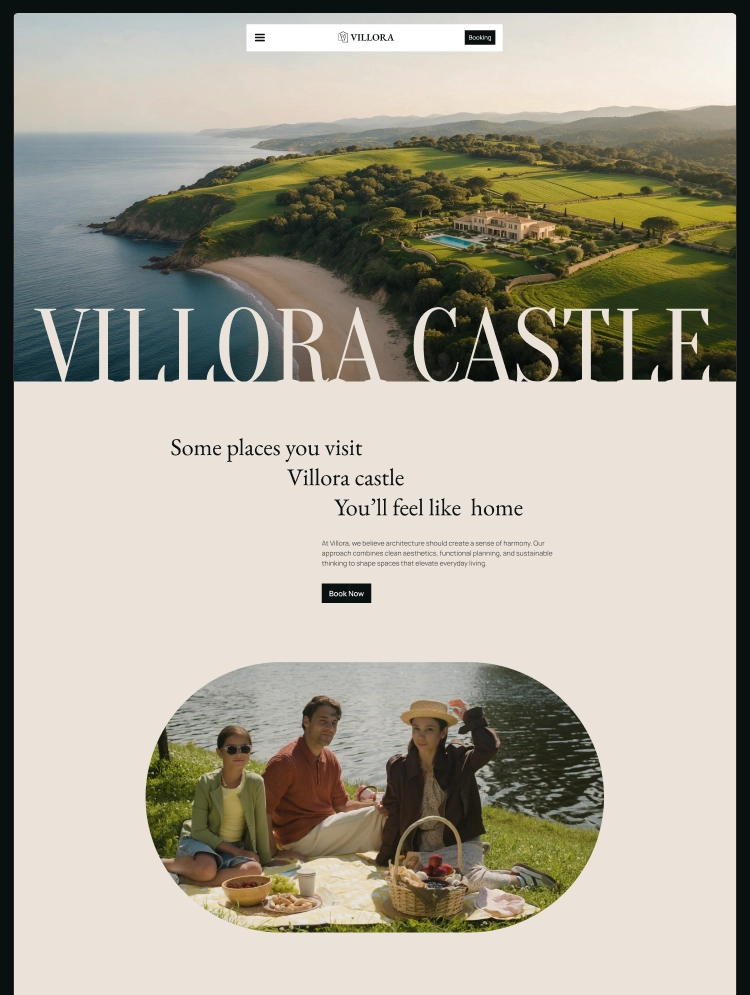
Villora is a Webflow luxury villa and vacation rental template for resorts, retreats, and boutique stays. CMS-powered Activities, Facilities, Vouchers, and Blog, plus Booking, Gallery, About, and Contact pages, with smooth GSAP animations throughout.
Guests choose a villa by picturing the stay before they book it. Villora is a modern Webflow template built for luxury villas, vacation rentals, boutique resorts, retreats, and private estates that need a polished website to show off their property, experiences, and amenities, and to turn visitors into booking enquiries.
A full homepage, CMS-powered Activities, Facilities, Vouchers, and Blog systems, a dedicated Booking page, a Gallery, and a complete set of inner and utility pages give you everything you need to present your property. Every page shares a unified design system, reusable components, and a flexible variable system, so the whole site stays consistent as you edit it.
It is designed for villa owners and hosts, vacation rental operators, boutique hotels and resorts, wellness and countryside retreats, and agencies building hospitality websites for their clients.
Total pages:20+
Homepage layouts:1
CMS collections:4 (Activities, Facilities, Vouchers, and Blog)
Team section: Yes
Testimonials: Yes
Animations: GSAP and Lenis smooth scrolling, scroll effects.
Newsletter: Yes, with built-in email signup in the footer
Reusable components:6+ modern, accessible components
Online store:No
Booking or enquiry form: Yes
Responsive:Fully responsive across desktop, tablet, and mobile breakpoints
Design system:Global variables, reusable symbols, and consistent styling
Utility pages:Style Guide, Instructions, Changelog, Licenses, 404, Password Protected
Main pages
Home
About
Activities
Facilities
Vouchers
Blog
Gallery
Booking
Contact
CMS pages
Blog Details
Activity Details
Facility Details
Voucher Details
Utility pages
404
Licenses
Changelog
Style Guide
Instructions
Password Protected
Legal pages
Privacy Policy
Showcase experiences with dynamic Activities
The Activities collection gives every experience its own page, from sunset beach walks and private boat trips to bonfires, farm visits, and lake fishing. Each activity page includes duration, best time, location, availability, difficulty, and who it is ideal for, with a direct link to reserve.
Present every amenity with Facilities pages
Pools, private beaches, fine dining, spa and wellness, fitness, and private suites each get a dedicated detail page. Use them to explain access, opening hours, and what guests can enjoy, so common questions are answered before anyone gets in touch.
Sell experiences with Vouchers
The Vouchers section presents packages such as a sunset dinner, a spa day, or a weekend escape, each with a starting price, inclusions, and a simple four-step “how it works” guide. Vouchers are a natural fit for gifts, anniversaries, and upsells to existing guests.
Booking enquiry page
A dedicated Booking page with an enquiry form lets guests tell you what they are interested in and start planning their stay. The Contact page also links to your listings on Airbnb, Booking.com, and Agoda, so guests can book on the platform they already trust.
Gallery and villa tour
A full Gallery page and a “watch villa tour” video section let the property sell itself through photography and video.
CMS-powered blog
Publish travel guides, local tips, and stories about your property through Webflow CMS. New posts appear automatically across the blog listing and related sections.
Built-in FAQ and testimonials
Tabbed FAQs (Villa, Location, Booking) and guest testimonials help answer questions and build trust before a guest enquires.
Newsletter section for repeat guests
A built-in newsletter signup helps you stay in touch with past and future guests for seasonal offers, new experiences, and voucher promotions.
Variable-powered customization
The template uses a clean variable system for global design control. Update brand colors, typography, spacing, and other visual settings from one place to keep the entire site consistent.
Responsive across every breakpoint
Every page and component is designed to work across desktop, tablet, and mobile, giving guests a consistent experience on every device.
Built with performance and SEO in mind
Villora uses semantic HTML, optimized WebP images, per-item SEO fields on CMS pages, and structured content to give you a strong foundation for performance and search visibility.
What this template does not do
Villora provides the structure for presenting your property, experiences, and amenities, but it does not include a live booking engine, availability calendar, channel manager, online payments, or voucher checkout. The Booking page is an enquiry form, and voucher prices are display content; connect your own booking system, payment provider, or third-party listing if you want guests to pay online.
You remain responsible for the accuracy of your pricing, availability, amenities, policies, and published content. Demo images and text are placeholders to replace with your own.
● Luxury villa owners and private estate hosts.
● Vacation rental and holiday home operators.
● Boutique hotels, beach resorts, and coastal retreats.
● Wellness, spa, and countryside or farm stay retreats.
● Event and experience-led properties offering activities and packages.
● Property managers presenting one or several rentals.
● Agencies and freelancers building hospitality websites for clients.
Activities, facilities, vouchers, and blog posts are managed through Webflow CMS. Adding a new experience, amenity, voucher, or article takes a single CMS entry, with no need to rebuild the design.
The variable system makes global customization straightforward. Change your colors, typography, and spacing from the design system and keep the entire website visually consistent.
If you would rather not do it yourself, our team can customize this template for you, from color and content changes through to new pages and custom functionality. Request a Webflow template customization quote, or explore our Webflow customization service.
Does Villora include a real booking system?
No. The Booking page uses a Webflow form for enquiries. You can connect a third-party booking engine or link to your Airbnb, Booking.com, or Agoda listings.
How are activities and facilities organized?
Through CMS collections. Adding a new activity or facility with its own detail page requires just a simple CMS entry.
Can guests buy vouchers online?
Not out of the box. Voucher pages show prices and inclusions and link to the Booking page. Online checkout needs a payment integration you connect.
Can I use it for more than one property?
Yes. You can adapt the Facilities or Activities collections, or add a new collection, to present multiple villas or rentals.
Is the template responsive?
Yes. The template is designed for desktop, tablet, and mobile breakpoints.
Can I get the Figma file?
Yes. Absolutely! You can contact our support team to request the Figma file.
Are the animations editable?
Yes. All animations can be fully adjusted or disabled directly within the Webflow Designer.
Support and ongoing updates are included. If you need help customizing Villora, setting up the CMS, modifying layouts, or adapting the template to your property, reach out after purchase for assistance.
Can only be used by you or one client for one end product. You cannot resell or redistribute this template in its original or modified state.
This template is free to use in both person and commercial projects. You cannot resell, redistribute, or license this template in its original or modified state.
Questions about this template? Just reach out to the template designer and they will get back to you within 2 business days.
For advanced design guidance, please share your questions in the Webflow Forum or reach out to a Webflow Partner.
Share your feedback by leaving a comment below.
For template support, please check the Support tab.

Use the Preview in Designer option to make any edits to the template pages and preview how the layout would fit your content. Changes in preview mode won't be saved.
It isn't possible to apply a template to an already existing project. Instead, you'll need to create a new project based on the Template.
With a Core plan (or higher), you can export sites you build in Webflow, including templates, to host them anywhere you'd like.
Webflow templates are only available for purchase through Workspaces and legacy individual accounts.
CMS templates are designed to use the power of the Webflow CMS. It is possible to downgrade to a Basic Site Plan as long as all CMS content is deleted from the project.
Use the View Connections tool to understand where the CMS content is on the site and delete any dynamic listings and CMS content. We also recommend you to check Components and the Collection page Templates.
Ecommerce templates are designed to use the power of Webflow Ecommerce. It is not possible to remove Ecommerce from a template, however, deleting all Ecommerce Products and Categories from the project, will allow to select a lower Site Plan.
Membership templates are designed to use the power of Webflow Membership. It is not possible to remove Memberships from a template.


Comes with GSAP animations and interactions for additional polish and usability.
Reposition and resize items anywhere within the grid to produce powerful, responsive layouts — faster and without code.
Build your lead lists and subscriber base with beautiful forms.
Comes with animations and interactions for additional polish and usability.