No items found.

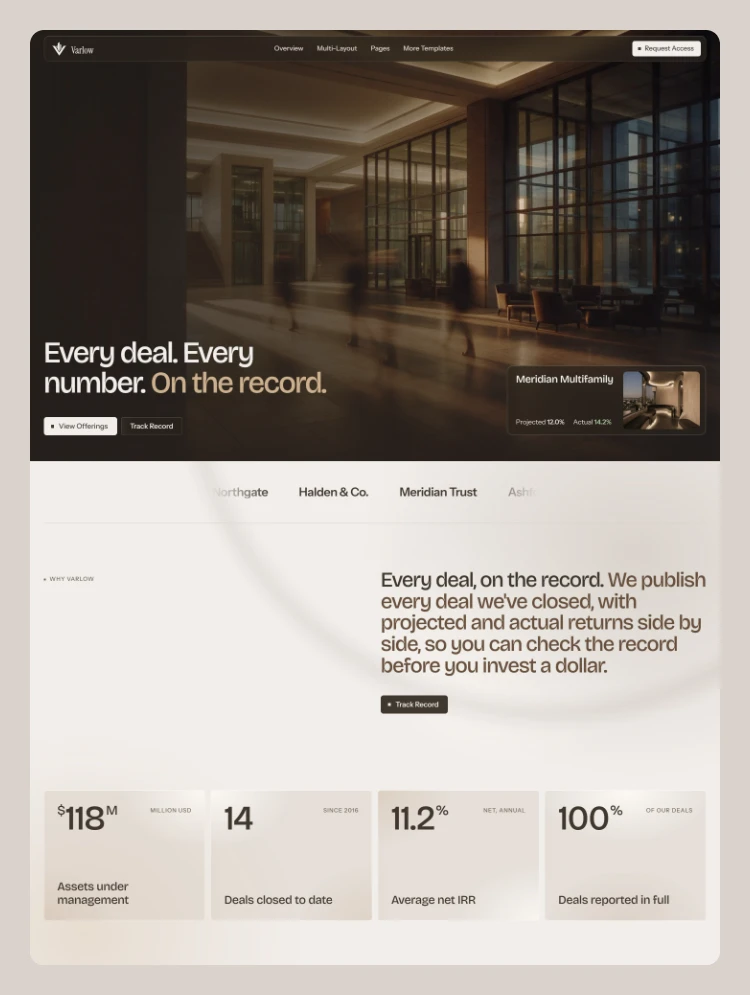
Varlow acquires cash-flowing multifamily and commercial assets in high-growth U.S. markets, and publishes projected and actual returns for every deal it closes.

Varlow: Real Estate Investment Firm Template

Varlow is a Webflow template for real estate investment firms that raise capital from accredited investors: syndication sponsors (GP/LP), turnkey rental providers and investment advisory firms. It is built around what investors check before they commit: a full deal record with projected and actual returns, the properties behind each deal, the markets the firm buys in, and a clear path to request access.

The tone reads like an annual report. Every figure lives in the CMS or in plain text, so you replace the numbers with your own and the layout holds.

Pages

  • 3 homepage layouts: Home A, Home B, Home C
  • 3 About layouts: About A (process, deal structure, team), About B (team, performance summary, case studies, principles), About C (story, core beliefs, asset thesis, step-by-step deal walkthrough, FAQ)
  • 3 Contact layouts: Contact A (direct contacts, leadership, office), Contact B (message form), Contact C (office visit and call scheduling)
  • Track Record: every deal with projected and actual IRR, status and hold period
  • Properties: filterable index of every property
  • Markets: market overview, comparison table, browse by region, opportunities by market
  • Investor Access: accreditation explainer, request form with self-certification, and what happens next
  • Insights: article index with filters, pagination and a grid/list view
  • CMS templates: Deal detail, Property detail, Article
  • Utility pages: Style Guide, Changelog, Licenses, 404, Password

CMS

Three connected collections:

  • Track Record: one item per deal with status (Open, Active, Exited), funding stage, projected and actual IRR, cash-on-cash, cap rate, equity raise, minimum investment, hold period, key dates and an investor story. Deals set to Open appear as Current Offerings across the site.
  • Properties: location, type, class, units, square footage, year built, occupancy, purchase price, a written case study, plus site and unit plans. Each deal references its property, and each property page lists its deals.
  • Insights: articles with category, audience, author, read time and featured image.

Features

  • Projected and actual returns side by side on every deal; deals still running show "In progress"
  • Dynamic deal page call to action: open deals show Request Access and Schedule a call, active and exited deals point to current offerings
  • CMS-driven offering cards with detail modals
  • Property pages with tabbed site and unit plans, a case study and links to the deals on that property
  • Shared footer call-to-action component with a partner logo marquee
  • Template notes on CMS-heavy sections that explain what to replace, easy to remove once you are done
  • Floating glass navigation with mega menus and a full mobile menu
  • Webflow Interactions with GSAP: page load reveals, scroll-driven process diagrams, marquees and hover states
  • Footer disclaimer paragraph ready for your attorney-reviewed text

Built properly

  • Webflow Variables for colour, typography and spacing: a six-colour palette and two typefaces (Instrument Sans and Instrument Serif)
  • 12-column grid, consistent Client-First style class naming and reusable components
  • Fully responsive across desktop, tablet and mobile
  • A unique SEO title and meta description on every page, Open Graph image, and alt text on all images
  • Accessible contrast, semantic heading structure, and clear hover and focus states
  • A complete Style Guide page

Swap in your logo, deals, properties and photography, and Varlow is ready to publish.

Designed by Zafre Media.

Show more
Single Use License

Can only be used by you or one client for one end product. You cannot resell or redistribute this template in its original or modified state.

Free License

This template is free to use in both person and commercial projects. You cannot resell, redistribute, or license this template in its original or modified state.

zafre media supports this template
Designed by zafre media

Questions about this template? Just reach out to the template designer and they will get back to you within 2 business days.

For advanced design guidance, please share your questions in the Webflow Forum or reach out to a Webflow Partner.

Loving this template?

Share your feedback by leaving a comment below.

For template support, please check the Support tab.

Is there a template demo available?

Use the Preview in Designer option to make any edits to the template pages and preview how the layout would fit your content. Changes in preview mode won't be saved.

Can templates be used in existing projects?

It isn't possible to apply a template to an already existing project. Instead, you'll need to create a new project based on the Template.

Can templates be exported?

With a Core plan (or higher), you can export sites you build in Webflow, including templates, to host them anywhere you'd like.

How to purchase a template from a legacy team account?

Webflow templates are only available for purchase through Workspaces and legacy individual accounts.

How to remove the CMS functionality from a template?

CMS templates are designed to use the power of the Webflow CMS. It is possible to downgrade to a Basic Site Plan as long as all CMS content is deleted from the project.

Use the View Connections tool to understand where the CMS content is on the site and delete any dynamic listings and CMS content. We also recommend you to check Components and the Collection page Templates.

How to remove the Ecommerce functionality from a template?

Ecommerce templates are designed to use the power of Webflow Ecommerce. It is not possible to remove Ecommerce from a template, however, deleting all Ecommerce Products and Categories from the project, will allow to select a lower Site Plan.

How to remove the Memberships functionality from a template?

Membership templates are designed to use the power of Webflow Membership. It is not possible to remove Memberships from a template.

Subcategory
Architecture
Architecture
Real Estate
Real Estate
Features
CMS
CSS Grid

Reposition and resize items anywhere within the grid to produce powerful, responsive layouts — faster and without code.

CMS
Forms

Build your lead lists and subscriber base with beautiful forms.

CMS
Interactions

Comes with animations and interactions for additional polish and usability.

Related Tags

Similar templates

Browse all

You might also like

Browse all
No items found.

More by zafre media

All templates by zafre media
Architecture
Real Estate