Trusted by teams at


A one-page website template for nutrition coaches and dietitians, built to turn a quick visit into a booked consult.
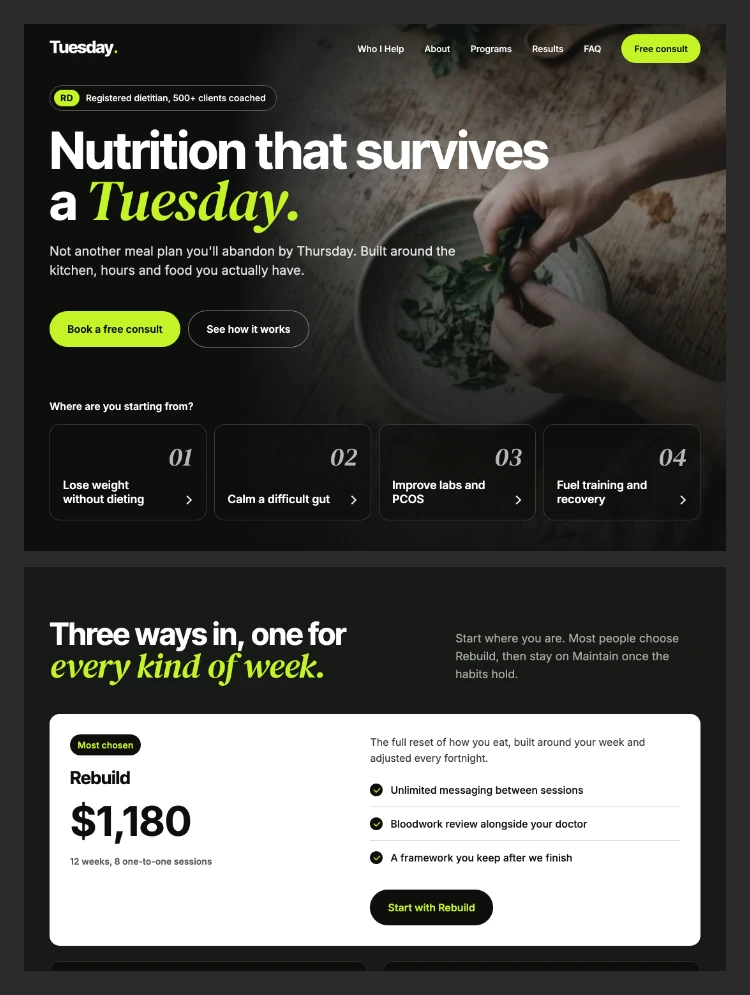
Tuesday is a one-page Webflow template for solo nutrition coaches, registered dietitians and small wellness practices. It is built around one idea: visitors should find themselves on the page before they read your bio.
Why Tuesday
- Goal tiles in the hero let visitors pick their reason (weight and energy, gut health, labs, sport) and jump straight to what fits them.
- Every section moves toward one action: booking a free consult.
- A calm, modern look: soft black canvas, one lime accent for actions, and a serif phrase that closes each headline.
- Real social proof built in: credentials, client results with full portrait testimonials, and an FAQ that answers objections.
- Every word is live, editable text. No copy is baked into images.
Sections
- Hero with background video and four goal tiles
- Who I Help, organised by goal rather than by service
- About, with credentials, stats and a signature
- Programs: one featured offer plus two plan cards
- How It Works: four steps on one timeline
- Results: four testimonial cards with portraits
- FAQ
- Contact form with goal choice chips
Pages included
- Home, Style Guide, Instructions, Licenses, Changelog and a branded 404 page
Built to edit
- Client-First classes and Title Case variables for colors, type and spacing
- Navbar, Footer and Contact CTA as reusable components
- Native Webflow Interactions with reduced-motion support
- One small, documented GSAP script for the count-up numbers
- Google Fonts only, and fully responsive down to mobile
Can only be used by you or one client for one end product. You cannot resell or redistribute this template in its original or modified state.
This template is free to use in both person and commercial projects. You cannot resell, redistribute, or license this template in its original or modified state.
Questions about this template? Just reach out to the template designer and they will get back to you within 2 business days.
For advanced design guidance, please share your questions in the Webflow Forum or reach out to a Webflow Partner.
Share your feedback by leaving a comment below.
For template support, please check the Support tab.

Use the Preview in Designer option to make any edits to the template pages and preview how the layout would fit your content. Changes in preview mode won't be saved.
It isn't possible to apply a template to an already existing project. Instead, you'll need to create a new project based on the Template.
With a Core plan (or higher), you can export sites you build in Webflow, including templates, to host them anywhere you'd like.
Webflow templates are only available for purchase through Workspaces and legacy individual accounts.
CMS templates are designed to use the power of the Webflow CMS. It is possible to downgrade to a Basic Site Plan as long as all CMS content is deleted from the project.
Use the View Connections tool to understand where the CMS content is on the site and delete any dynamic listings and CMS content. We also recommend you to check Components and the Collection page Templates.
Ecommerce templates are designed to use the power of Webflow Ecommerce. It is not possible to remove Ecommerce from a template, however, deleting all Ecommerce Products and Categories from the project, will allow to select a lower Site Plan.
Membership templates are designed to use the power of Webflow Membership. It is not possible to remove Memberships from a template.


Comes with GSAP animations and interactions for additional polish and usability.
Reposition and resize items anywhere within the grid to produce powerful, responsive layouts — faster and without code.
Build your lead lists and subscriber base with beautiful forms.
Comes with animations and interactions for additional polish and usability.