Trusted by teams at






Trends-Eng is a construction company website template built with Webflow. It showcases commercial construction, general contracting, residential building, civil infrastructure, and renovation services with detailed project pages.
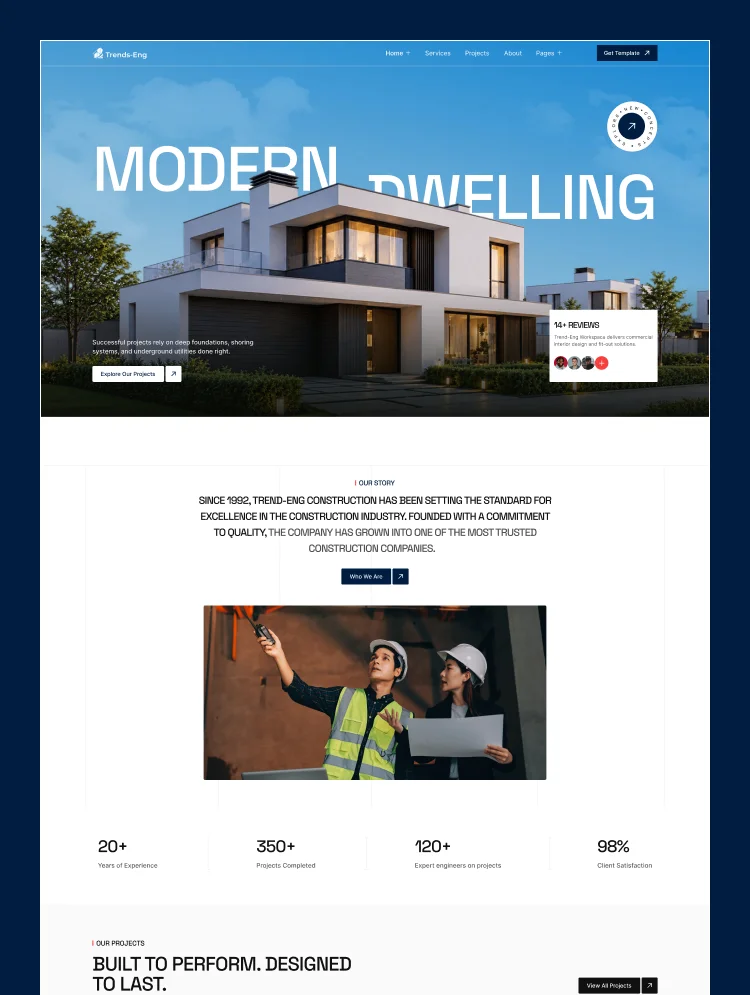
Trends-Eng is a modern construction website template built on Webflow for building and engineering companies that need to look as solid as the work they deliver. A deep navy and red palette, strong typography, and large project photography present every service and completed build with confidence.
CMS-driven service pages cover commercial construction, general contracting, residential construction, civil and infrastructure work, renovation and remodeling, design-build, and structural solutions. Each service page walks through the scope, a four-step delivery process, and client testimonials, while project pages present type, location, size, client, and duration alongside the approach and results.
A leadership page, a careers section with open roles, a construction blog, and a consultation form with service selection give visitors a clear path from first visit to enquiry. Three layouts each for the home, about, contact, and services pages make this construction Webflow template a complete site for growing building brands.
Best for: This construction company website template is best for building businesses of every size. It is perfect for general contractors, commercial construction companies, home builders and residential contractors, civil engineering and infrastructure firms, renovation and remodeling companies, design-build firms, structural engineering consultancies, and construction management companies.
This template has a total of 27 pages, including 16 static pages, 3 CMS collection pages, and 8 utility pages. It provides 3 homepage layouts, 3 about layouts, 3 contact layouts, and 3 services layouts, plus dedicated pages for projects, leadership, careers, and the blog.
Each page supports a step in the construction buying journey. Service Details pages explain what each service includes and how it is delivered, Project Details pages prove capability with real specifications and outcomes, and Blog Details pages share planning advice and building trends. The leadership and careers pages help firms build trust with clients and recruit site engineers, estimators, and designers.
This contractor website template is built around what clients check before hiring a builder: the services offered, proof from completed projects, the people leading the work, and an easy way to request a quote. Service pages, project case studies, a leadership page, and consultation forms give each of those a dedicated home.
Twelve layout variations let one template present a commercial contractor, a residential builder, or a full-service construction company differently. Webflow variables and reusable components keep rebranding fast, while the careers page and blog help growing firms hire talent and build authority in search.
● Bold Construction Design
A deep navy and signal-red palette, large project photography, and strong Space Grotesk headings give a construction brand an established, professional look from the first scroll.
● 12 Layout Variations
Home, About, Contact, and Services each come in three layouts, so one template can present a commercial contractor, a home builder, or an engineering firm without redesigning.
● Detailed Project Showcases
Project pages list type, location, size, status, client, architect, and duration, then cover highlights, approach, and results to prove capability to new clients.
● Built in Webflow CMS
Services, projects, and blog posts are managed as CMS collections. Add a new completed build or service and every related list updates automatically.
● Variables & Reusable Components
Colors run on Webflow variables and shared sections such as the navbar and footer are components, so rebranding takes minutes, as explained on the Instructions page.
● GSAP Motion & Interactive Sections
GSAP animations, animated counters, project and testimonial sliders, a logo ticker, and FAQ accordions keep long pages engaging.
STATIC PAGES · 16
CMS COLLECTION PAGES · 3
UTILITY PAGES · 8
Can only be used by you or one client for one end product. You cannot resell or redistribute this template in its original or modified state.
This template is free to use in both person and commercial projects. You cannot resell, redistribute, or license this template in its original or modified state.
Questions about this template? Just reach out to the template designer and they will get back to you within 2 business days.
For advanced design guidance, please share your questions in the Webflow Forum or reach out to a Webflow Partner.
Share your feedback by leaving a comment below.
For template support, please check the Support tab.

Use the Preview in Designer option to make any edits to the template pages and preview how the layout would fit your content. Changes in preview mode won't be saved.
It isn't possible to apply a template to an already existing project. Instead, you'll need to create a new project based on the Template.
With a Core plan (or higher), you can export sites you build in Webflow, including templates, to host them anywhere you'd like.
Webflow templates are only available for purchase through Workspaces and legacy individual accounts.
CMS templates are designed to use the power of the Webflow CMS. It is possible to downgrade to a Basic Site Plan as long as all CMS content is deleted from the project.
Use the View Connections tool to understand where the CMS content is on the site and delete any dynamic listings and CMS content. We also recommend you to check Components and the Collection page Templates.
Ecommerce templates are designed to use the power of Webflow Ecommerce. It is not possible to remove Ecommerce from a template, however, deleting all Ecommerce Products and Categories from the project, will allow to select a lower Site Plan.
Membership templates are designed to use the power of Webflow Membership. It is not possible to remove Memberships from a template.
.svg)


Reposition and resize items anywhere within the grid to produce powerful, responsive layouts — faster and without code.
Build your lead lists and subscriber base with beautiful forms.
Comes with animations and interactions for additional polish and usability.