Trusted by teams at






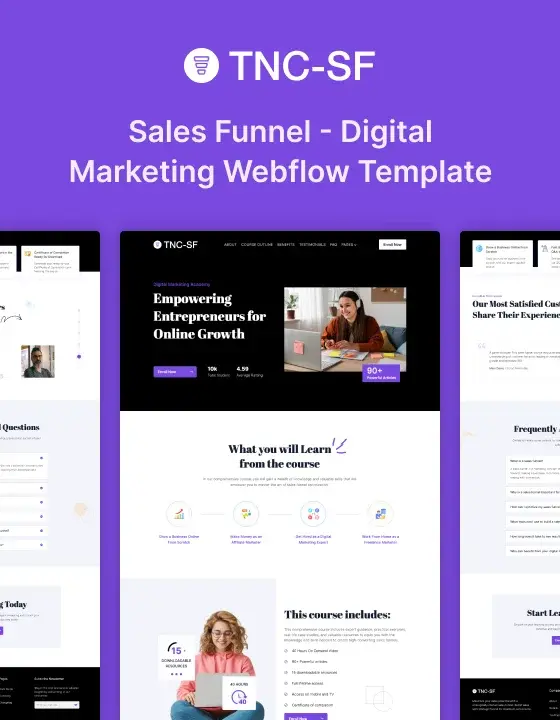
TNC Sales Funnel is a sales funnel website template built as a focused one page with one main call to action and an email capture. It is ideal for promoting an online course, coaching program, workshop, single product, or course with a landing page designed to turn visitors into leads or participants. With no navigation, inner pages, or CMS, the template keeps attention on the coming soon offer, online course, course content, coaching offer, workshop, or single product and its main call to action. TNC Sales Funnel provides a professional one page landing page structure for a course launch, coming soon announcement, single product promotion, or focused sales funnel campaign, keeping the landing page experience simple and conversion-focused.
A funnel page has one job and every extra link works against it. TNC Sales Funnel is a sales funnel website template built as a focused one page with no navigation to wander into and one thing to do at the end. It works well for an online course, course launch, coaching offer, workshop, single product, or landing page where the page needs to keep visitors focused on one conversion. The one page structure makes it suitable for a coming soon announcement, course promotion, product launch, or focused landing page campaign.
It suits a lead magnet, webinar or online course registration, coaching program, workshop registration, single product launch, coming soon campaign, or paid campaign where the only measure is the conversion. TNC Sales Funnel is ideal for promoting an online course, course, coaching service, workshop, or single product through a focused landing page without unnecessary navigation, while keeping the one page sales funnel experience clear and direct.
Static pages
Section folders
Every link off a funnel page is a way out. This build removes them, which is the whole point of the format and something most templates will not do.
It is one page with no CMS, no blog and no inner pages. It does not run split tests, connect to an email or CRM platform beyond the form, deliver a lead magnet file, or process payment. Those come from your funnel or email stack, and the page hands off to it.
TNC Sales Funnel gives an online course a focused landing page to showcase online course content, online course features, online course benefits, online course program, and online course results. Present course details, learning outcomes, registration information, and key benefits while keeping visitors focused on conversion.
A coaching business can use TNC Sales Funnel to showcase coaching services, coaching programs, coaching benefits, coaching expertise, and coaching results. Present coaching offers, client outcomes, program details, testimonials, and registration information through a focused conversion page.
TNC Sales Funnel helps a workshop showcase workshop content, workshop sessions, workshop benefits, workshop schedule, and workshop registration. Present workshop details, learning outcomes, instructor information, pricing, and registration options while keeping the page focused on one clear action.
TNC Sales Funnel gives a one page campaign a focused space to showcase one page content, one page offers, one page services, one page information, and one page conversion goals. Present an offer, call to action, email capture, and key details through a focused one page website.
TNC Sales Funnel helps a coming soon campaign showcase coming soon information, coming soon offers, coming soon products, coming soon announcements, and coming soon updates. Present launch details, email capture, product information, and a clear call to action through a professional coming soon page.
TNC Sales Funnel gives a landing page a professional space to showcase landing page content, landing page offers, landing page features, landing page benefits, and landing page calls to action. Present an online course, coaching offer, workshop, or product launch through a focused landing page.
TNC Sales Funnel helps a single product campaign showcase single product information, single product features, single product benefits, single product details, and single product offers. Present the product, key benefits, launch information, email capture, and main call to action through a focused single product page.
TNC Sales Funnel gives an online courses business a focused space to showcase online courses content, online courses programs, online courses features, online courses benefits, and online courses offers. Present course information, learning benefits, registration details, and a clear call to action through a professional online courses landing page.
TNC Sales Funnel helps a course business showcase course content, course features, course benefits, course information, and course offers. Present lessons, registration details, course value, email capture, and the main call to action through a focused course landing page.
TNC Sales Funnel also gives an online course, coaching, or workshop business a focused space to showcase offers, benefits, results, registration details, and conversion-focused content. Present course programs, coaching services, workshop information, testimonials, and clear calls to action without unnecessary navigation.
A single static page edited in the Designer. No CMS. Duplicate it for each campaign variant.
If you would rather not do it yourself, our team can customise this template for you, from colour and content changes through to new pages and custom functionality. Request a Webflow template customization quote, or read more about our Webflow customization service.
How many pages is it?
One.
Is there a blog or CMS?
No, and that is deliberate for this format.
Does it deliver the lead magnet?
No. The form captures the address and your email platform delivers.
Can I split test?
Not natively. Duplicate the page and run the test through your own tooling.
Can I take payment?
No. There is no checkout.
Support and ongoing updates are included. Message us after purchase if you need the Figma file and we will send it over.
Can only be used by you or one client for one end product. You cannot resell or redistribute this template in its original or modified state.
This template is free to use in both person and commercial projects. You cannot resell, redistribute, or license this template in its original or modified state.
Questions about this template? Just reach out to the template designer and they will get back to you within 2 business days.
For advanced design guidance, please share your questions in the Webflow Forum or reach out to a Webflow Partner.
Share your feedback by leaving a comment below.
For template support, please check the Support tab.

Use the Preview in Designer option to make any edits to the template pages and preview how the layout would fit your content. Changes in preview mode won't be saved.
It isn't possible to apply a template to an already existing project. Instead, you'll need to create a new project based on the Template.
With a Core plan (or higher), you can export sites you build in Webflow, including templates, to host them anywhere you'd like.
Webflow templates are only available for purchase through Workspaces and legacy individual accounts.
CMS templates are designed to use the power of the Webflow CMS. It is possible to downgrade to a Basic Site Plan as long as all CMS content is deleted from the project.
Use the View Connections tool to understand where the CMS content is on the site and delete any dynamic listings and CMS content. We also recommend you to check Components and the Collection page Templates.
Ecommerce templates are designed to use the power of Webflow Ecommerce. It is not possible to remove Ecommerce from a template, however, deleting all Ecommerce Products and Categories from the project, will allow to select a lower Site Plan.
Membership templates are designed to use the power of Webflow Membership. It is not possible to remove Memberships from a template.
.svg)


Reposition and resize items anywhere within the grid to produce powerful, responsive layouts — faster and without code.
Build your lead lists and subscriber base with beautiful forms.
Comes with animations and interactions for additional polish and usability.
Displays perfectly on desktops, tablets, and phones.
Site navigation automatically collapses into a mobile-friendly menu on smaller devices.
Display images and text elegantly on every device with our touch-friendly slider.
All graphics are optimized for devices with high DPI screens.
Reusable elements you can use across your site. Edit a component and all copies update instantly.
Uses fonts from Google's Web Font collection.