Trusted by teams at






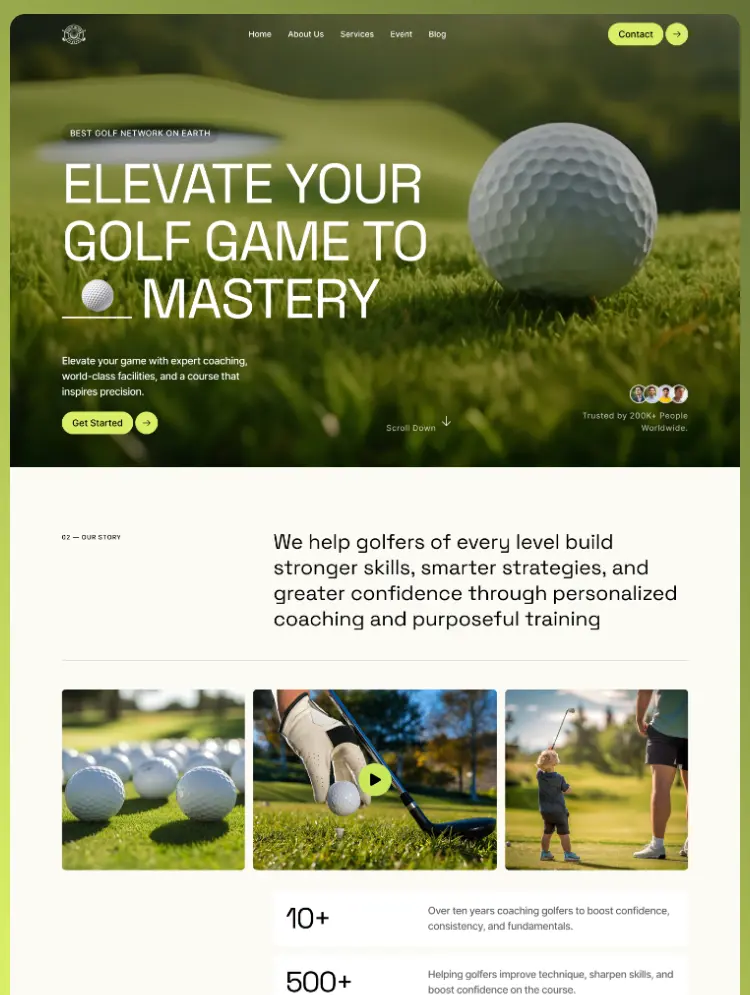
Swingora is a premium golf club and golf coaching Webflow template designed for golf academies, professional coaches, instructors, training facilities, golf courses, and modern sports clubs. Showcase coaching services, events, instructors.
Swingora is a modern Golf Club & Golf Coaching Webflow Template created for businesses that want to build a strong and professional presence in the golf industry.
Whether you're launching a website for a golf academy, private golf coach, golf instructor, country club, golf course, training facility, or player development program, Swingora gives you the pages and content structure needed to present your services and attract new players.
The template combines strong visual storytelling with a clear user journey, making it easy for visitors to discover your coaching programs, learn about your team, explore upcoming golf events, read educational content, and get in touch.
Swingora is designed around the real content needs of a golf business.
Present private coaching, group training, swing analysis, course coaching, golf lessons, and player development programs through dedicated service layouts. Individual service pages give you enough space to explain your coaching approach, training process, benefits, skill levels, and calls to action.
This makes Swingora suitable for both independent golf instructors and larger golf academies or clubs offering multiple training programs.
Keep your community engaged with dedicated event pages for tournaments, club championships, clinics, junior golf days, social events, workshops, and other golf experiences.
The event-focused structure makes Swingora a strong choice for golf clubs and organizations where community, competitions, and recurring events are an important part of the business.
Swingora includes a complete blog experience for publishing useful golf content around swing techniques, putting, equipment, coaching, course strategy, player mindset, and other topics.
Use the blog to educate your audience, establish authority in the golf industry, support your content marketing strategy, and build an SEO-focused library of golf resources over time.
Introduce your golf club or academy through a dedicated About experience featuring your story, achievements, team, mission, vision, partners, testimonials, and other credibility-building content.
For coaching businesses where customers need to trust the instructor before booking a lesson, these sections help communicate experience and professionalism.
Swingora includes a dedicated contact experience where prospective players can reach out about lessons, memberships, coaching programs, events, or other inquiries.
Strategically placed calls to action throughout the template help guide visitors from discovering your brand toward taking the next step.
Swingora is ideal for golf clubs, golf academies, golf coaches, private golf instructors, golf training centers, golf courses, country clubs, junior golf programs, golf schools, swing coaches, player development programs, sports clubs, and other golf-related businesses.
With its golf-focused structure and flexible Webflow foundation, you can easily adapt Swingora to match your brand, services, coaching programs, imagery, and content.
Build a professional golf website, showcase your expertise, grow your community, and give players a better way to discover your club with Swingora.
Can only be used by you or one client for one end product. You cannot resell or redistribute this template in its original or modified state.
This template is free to use in both person and commercial projects. You cannot resell, redistribute, or license this template in its original or modified state.
Questions about this template? Just reach out to the template designer and they will get back to you within 2 business days.
For advanced design guidance, please share your questions in the Webflow Forum or reach out to a Webflow Partner.
Share your feedback by leaving a comment below.
For template support, please check the Support tab.

Use the Preview in Designer option to make any edits to the template pages and preview how the layout would fit your content. Changes in preview mode won't be saved.
It isn't possible to apply a template to an already existing project. Instead, you'll need to create a new project based on the Template.
With a Core plan (or higher), you can export sites you build in Webflow, including templates, to host them anywhere you'd like.
Webflow templates are only available for purchase through Workspaces and legacy individual accounts.
CMS templates are designed to use the power of the Webflow CMS. It is possible to downgrade to a Basic Site Plan as long as all CMS content is deleted from the project.
Use the View Connections tool to understand where the CMS content is on the site and delete any dynamic listings and CMS content. We also recommend you to check Components and the Collection page Templates.
Ecommerce templates are designed to use the power of Webflow Ecommerce. It is not possible to remove Ecommerce from a template, however, deleting all Ecommerce Products and Categories from the project, will allow to select a lower Site Plan.
Membership templates are designed to use the power of Webflow Membership. It is not possible to remove Memberships from a template.
.svg)


Comes with GSAP animations and interactions for additional polish and usability.