Trusted by teams at






Resolvo turns customer support into a clear product story and helps SaaS teams present workflows, knowledge and value. Built for customer support SaaS, help desk platforms, live chat tools, & ticketing startups that need to present workflows clearly.
The customer support and help desk SaaS space depends on speed, clarity, and trust. Every software product, startup, agency, and enterprise team eventually needs a support layer that feels organized and reliable from the first scroll. Let me introduce Resolvo, a modern Webflow SaaS website template created for customer support platforms, help desk tools, and SaaS teams. Resolvo clearly presents ticket workflows, knowledge base content, and support operations in a structured experience that feels built for real product teams and serious buyers.
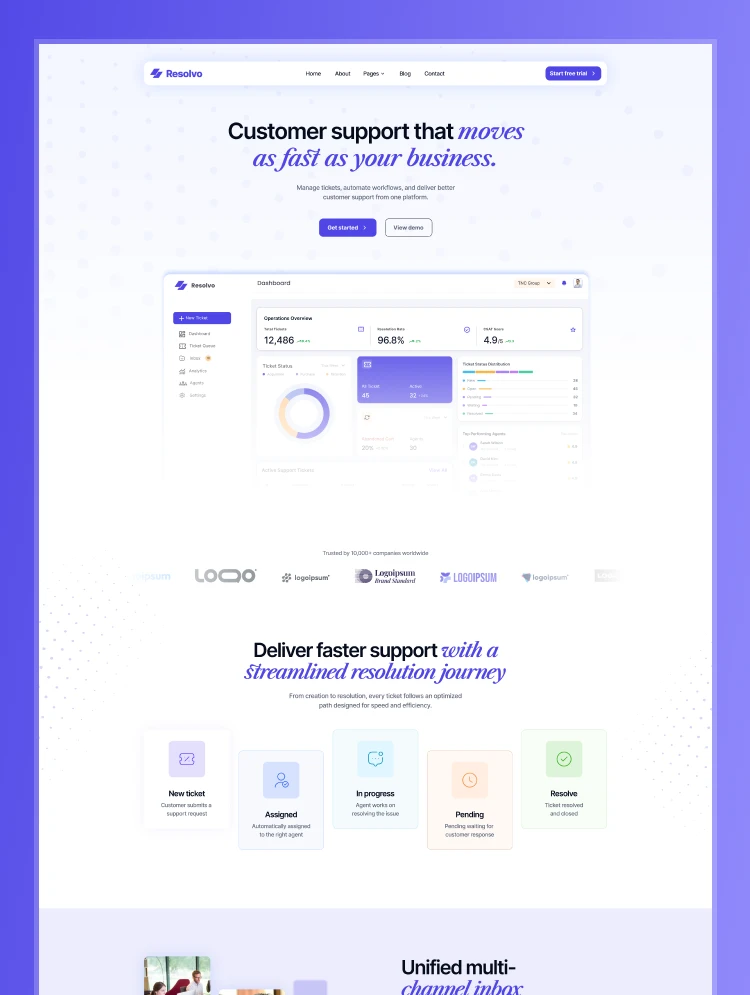
Every page and section of Resolvo is designed to guide the buyer journey with precision and purpose. Resolvo features a strong hero section, a structured ticket workflow visualization, a live status mockup section, CMS-powered knowledge base previews, and clean feature layouts that make your product easier to understand. With Webflow CMS at its core, your team can update content easily while keeping the website polished, scalable, and conversion-focused.
Explore the live preview now!
Resolvo is built for customer support SaaS founders, live chat tool makers, ticketing platform startups, CX agencies building client-facing portals, indie hackers launching Zendesk or Intercom alternatives, and any software brand that needs to present support workflows clearly and professionally.
Support-Focused Design: Resolvo uses a clean, modern visual style that feels trustworthy, organized, and built for software companies.
High-Impact Hero Section: The homepage opens with a strong hero that instantly positions your product, communicates value, and drives visitors toward action.
Ticket Workflow Visualization: Showcase your support process with a structured workflow section that makes ticket handling feel clear and easy to understand.
Live Status Mockup Section: Present your support system with a realistic status-style UI that adds credibility and product clarity.
CMS-Powered Knowledge Base: Publish help articles, product guides, and support resources with an easy-to-manage content system.
Product and Feature Showcase: Explain your platform’s core functionality with clean, structured sections that simplify complex support tools.
Trust-Building Content Blocks: Reinforce confidence with strong messaging, polished visuals, and layouts tailored to SaaS buyers.
Fully Responsive Build: Resolvo looks great on desktops, tablets, mobile devices, and every screen size.
Advanced Animations & Interactions: Smooth transitions and subtle motion effects create a premium browsing experience.
Utility Pages Included: Resolvo includes essential pages such as Style Guide, 404 page, and other standard setup pages for a complete Webflow experience.
Message us after purchase for the Figma source file delivered instantly.
Resolvo follows Webflow Marketplace standards with a clean CMS structure, organized collections, and a mobile-first build. Duplicate it to your workspace, swap in your brand colors, visuals, and copy, then publish in hours. Every page is designed to help your customer support or help desk brand look credible, modern, and ready to convert high-value buyers.
Can only be used by you or one client for one end product. You cannot resell or redistribute this template in its original or modified state.
This template is free to use in both person and commercial projects. You cannot resell, redistribute, or license this template in its original or modified state.
Questions about this template? Just reach out to the template designer and they will get back to you within 2 business days.
For advanced design guidance, please share your questions in the Webflow Forum or reach out to a Webflow Partner.
Share your feedback by leaving a comment below.
For template support, please check the Support tab.

Use the Preview in Designer option to make any edits to the template pages and preview how the layout would fit your content. Changes in preview mode won't be saved.
It isn't possible to apply a template to an already existing project. Instead, you'll need to create a new project based on the Template.
With a Core plan (or higher), you can export sites you build in Webflow, including templates, to host them anywhere you'd like.
Webflow templates are only available for purchase through Workspaces and legacy individual accounts.
CMS templates are designed to use the power of the Webflow CMS. It is possible to downgrade to a Basic Site Plan as long as all CMS content is deleted from the project.
Use the View Connections tool to understand where the CMS content is on the site and delete any dynamic listings and CMS content. We also recommend you to check Components and the Collection page Templates.
Ecommerce templates are designed to use the power of Webflow Ecommerce. It is not possible to remove Ecommerce from a template, however, deleting all Ecommerce Products and Categories from the project, will allow to select a lower Site Plan.
Membership templates are designed to use the power of Webflow Membership. It is not possible to remove Memberships from a template.
.svg)


Comes with GSAP animations and interactions for additional polish and usability.
Reposition and resize items anywhere within the grid to produce powerful, responsive layouts — faster and without code.
Build your lead lists and subscriber base with beautiful forms.
Comes with animations and interactions for additional polish and usability.