Trusted by teams at






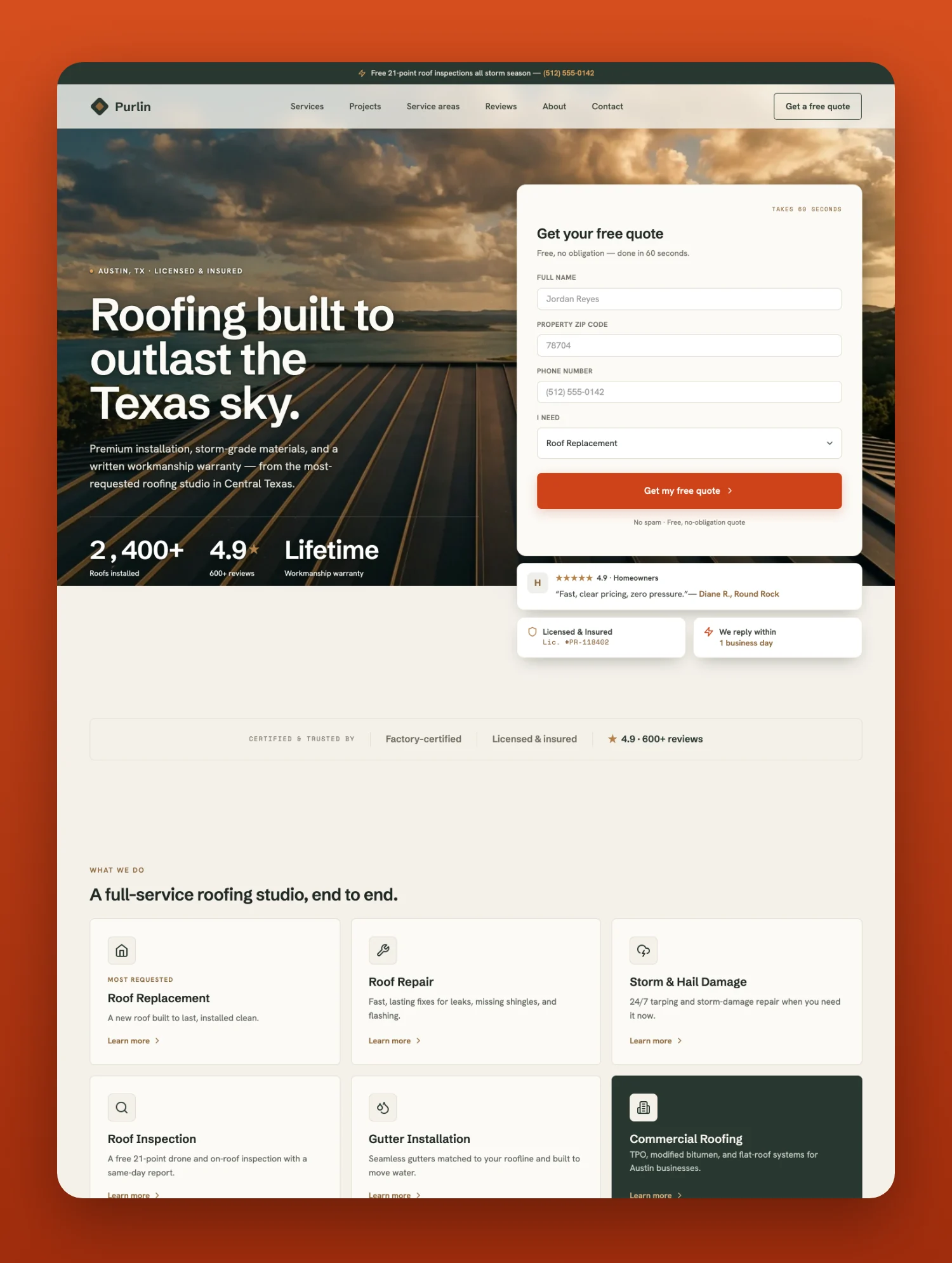
Purlin is a lead generation website template for roofing contractors, roofers and roofing companies. 19 page layouts, ten CMS collections, a quote form that collects the service needed and the ZIP code, before and after project photos, and GSAP motion.
Purlin is built to do one thing for roofing companies: turn visitors into booked estimates. It is made for roofing contractors, roofers and roofing companies, including gutter installers and storm and hail damage specialists.
Built to convert. A header with click to call and quote buttons, plus a sticky call and quote bar on mobile. A hero stat row shows the rating, review count and warranty, and a trust strip with credentials and review scores follows directly below the hero. Before and after photos sit side by side on every project page on desktop (stacked on tablet and mobile), so a homeowner sees the old roof and the finished one at a glance. The quote form collects name, ZIP code, phone and the service needed, so every lead arrives ready to call. Financing examples and the workmanship warranty are on the Home page, not buried on an inner page.
Real service pages, not filler. Six service detail pages cover roof repair, roof replacement, roof inspection, storm and hail damage, gutter installation, and commercial roofing. Every one is written out in full, so you can launch with real copy and edit it down rather than staring at lorem ipsum. Project case studies carry the materials and the duration. There is a reviews page, service area pages with local copy, nearby towns and area reviews, and a written blog covering storm damage and roof insurance claims.
Fast, calm motion. Motion runs on GSAP: scroll reveals, count ups and smooth accordions, with simple CSS hover transitions. Most animations respect reduced motion preferences, and every animation script is listed on the Instructions page under How to Edit GSAP Animations, with an element map for the main hooks, so you can remove any of them.
Easy to make yours. Variables are provided for colours, type and spacing and applied to the base styles. Components power the navbars, the CTA bands and the cards, so a change to a component's design updates every page that uses it. Ten CMS collections (Services, Projects, Reviews, Service Areas, Blog Posts, Team, FAQs, Process Steps, Blog Categories and Project Categories) mean one edit updates every list and page that shows the item (form dropdowns and typed mentions are edited by hand). Every photo slot on the demo pages ships with a ready to use image you can use as it is or replace with the client's own work.
19 page layouts: Home, Services, Service Detail, Projects, Project Detail, Service Areas, Service Area Detail, Reviews, About, Contact, Blog, Blog Post, Instructions, Style Guide, Licenses, Changelog, Privacy Policy, Terms of Service and a custom 404, with demo content for six services, seven projects, six service areas and seven blog posts.
Features - GSAP powered animations - Variables for colours, type and spacing - Component based navbars, CTA bands and cards - Ten CMS collections wired across the site - Ready to use imagery, easy to replace - SEO and Open Graph settings filled in on every page - Fully responsive across desktop, tablet and mobile This template is best for: Roofing companies, roofing contractors, roofers, roof repair services, roof replacement companies, roof inspection services, storm damage restoration companies, hail damage repair specialists, gutter installation services, gutter companies, commercial roofing services, residential roofing services, metal roofing companies, shingle roofing companies, and any local trade that sells estimates.Can only be used by you or one client for one end product. You cannot resell or redistribute this template in its original or modified state.
This template is free to use in both person and commercial projects. You cannot resell, redistribute, or license this template in its original or modified state.
Questions about this template? Just reach out to the template designer and they will get back to you within 2 business days.
For advanced design guidance, please share your questions in the Webflow Forum or reach out to a Webflow Partner.
Share your feedback by leaving a comment below.
For template support, please check the Support tab.

Use the Preview in Designer option to make any edits to the template pages and preview how the layout would fit your content. Changes in preview mode won't be saved.
It isn't possible to apply a template to an already existing project. Instead, you'll need to create a new project based on the Template.
With a Core plan (or higher), you can export sites you build in Webflow, including templates, to host them anywhere you'd like.
Webflow templates are only available for purchase through Workspaces and legacy individual accounts.
CMS templates are designed to use the power of the Webflow CMS. It is possible to downgrade to a Basic Site Plan as long as all CMS content is deleted from the project.
Use the View Connections tool to understand where the CMS content is on the site and delete any dynamic listings and CMS content. We also recommend you to check Components and the Collection page Templates.
Ecommerce templates are designed to use the power of Webflow Ecommerce. It is not possible to remove Ecommerce from a template, however, deleting all Ecommerce Products and Categories from the project, will allow to select a lower Site Plan.
Membership templates are designed to use the power of Webflow Membership. It is not possible to remove Memberships from a template.
.svg)


Reposition and resize items anywhere within the grid to produce powerful, responsive layouts — faster and without code.
Reusable elements you can use across your site. Edit a component and all copies update instantly.
Customize the built-in database for your project or just add new content.
Custom design for the 404 page of your website
Build your lead lists and subscriber base with beautiful forms.
Comes with GSAP animations and interactions for additional polish and usability.
Comes with animations and interactions for additional polish and usability.
Displays perfectly on desktops, tablets, and phones.
Site navigation automatically collapses into a mobile-friendly menu on smaller devices.
All graphics are optimized for devices with high DPI screens.
Uses fonts from Google's Web Font collection.