Trusted by teams at






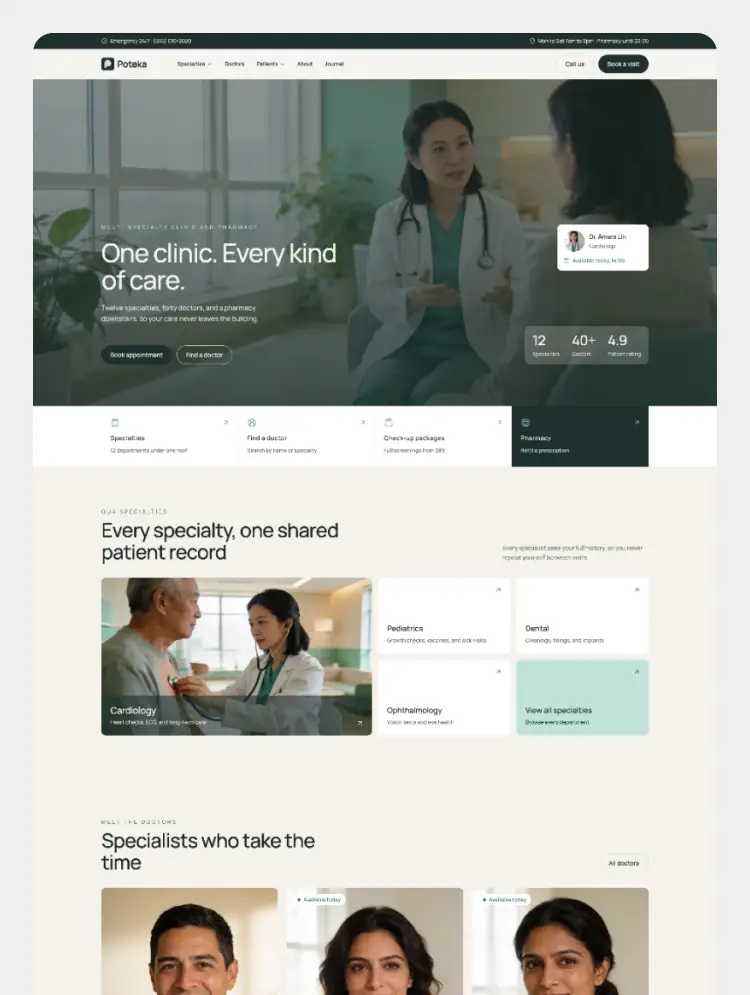
Poteka is a Webflow template for multi-specialty clinics and pharmacies, with CMS-driven specialties, doctor profiles, checkup packages, a pharmacy page, a health journal and a three-step booking form.
Poteka is a Webflow template for multi-specialty clinics, medical centres and in-house pharmacies. It gives patients one clear place to find a specialty, meet the right doctor, compare checkup packages and book a visit, all from a calm, modern design that is easy to make your own.
Pages
- Home
- About
- Specialties and Specialty detail (CMS)
- Doctors and Doctor profile (CMS)
- Checkup Packages and Package detail (CMS)
- Pharmacy
- Journal and Article (CMS)
- Appointments
- Style Guide, Instructions, Licenses, Changelog, 404 and 401
Built for clinics
- Navbar with mega menus: a Specialties menu filled from the CMS, a Patients menu and promo cards, plus a topbar for the emergency line and opening hours
- Specialty pages with services, conditions treated, the doctors in that specialty and a sidebar that highlights the current specialty
- Doctor profiles with photo, short bio, practice days and hours, consultation fee and an "Available today" badge driven by a CMS switch
- Checkup packages with prices, included tests and visit times
- Pharmacy page for prescriptions, refills, pharmacist advice, home delivery and vaccinations
- Three-step booking form for doctor visits, checkup packages and pharmacy refills
- Health journal with a reviewing doctor and read time on every article
CMS collections
- Specialties
- Doctors
- Packages
- Blogs
- Testimonials
All text fields are plain text, so content stays consistent and is easy to edit in the Editor.
Easy to customise
- Components with variants and editable properties for the navbar, footer, CTA, FAQ, buttons and every Home section
- Colors, sizes and typography built on Webflow variables, with Tablet and Mobile modes
- Flexbox layouts that are simple to adjust in the Designer
- Manrope from Google Fonts and Iconoir icons that follow the text color
- Native Webflow interactions for image reveals, hover states and staggered cards
- Fully responsive, from large desktop to small mobile
- Instructions page that explains how the components, variants and CMS fit together
Can only be used by you or one client for one end product. You cannot resell or redistribute this template in its original or modified state.
This template is free to use in both person and commercial projects. You cannot resell, redistribute, or license this template in its original or modified state.
Questions about this template? Just reach out to the template designer and they will get back to you within 2 business days.
For advanced design guidance, please share your questions in the Webflow Forum or reach out to a Webflow Partner.
Share your feedback by leaving a comment below.
For template support, please check the Support tab.

Use the Preview in Designer option to make any edits to the template pages and preview how the layout would fit your content. Changes in preview mode won't be saved.
It isn't possible to apply a template to an already existing project. Instead, you'll need to create a new project based on the Template.
With a Core plan (or higher), you can export sites you build in Webflow, including templates, to host them anywhere you'd like.
Webflow templates are only available for purchase through Workspaces and legacy individual accounts.
CMS templates are designed to use the power of the Webflow CMS. It is possible to downgrade to a Basic Site Plan as long as all CMS content is deleted from the project.
Use the View Connections tool to understand where the CMS content is on the site and delete any dynamic listings and CMS content. We also recommend you to check Components and the Collection page Templates.
Ecommerce templates are designed to use the power of Webflow Ecommerce. It is not possible to remove Ecommerce from a template, however, deleting all Ecommerce Products and Categories from the project, will allow to select a lower Site Plan.
Membership templates are designed to use the power of Webflow Membership. It is not possible to remove Memberships from a template.
.svg)


Reposition and resize items anywhere within the grid to produce powerful, responsive layouts — faster and without code.
Build your lead lists and subscriber base with beautiful forms.
Comes with animations and interactions for additional polish and usability.