Trusted by teams at






Plenary Advisory is a calm, editorial template for consulting and advisory firms: three homepages, three About and three Contact layouts, CMS case files, insights and team, built on Client First with Webflow variables and GSAP interactions.
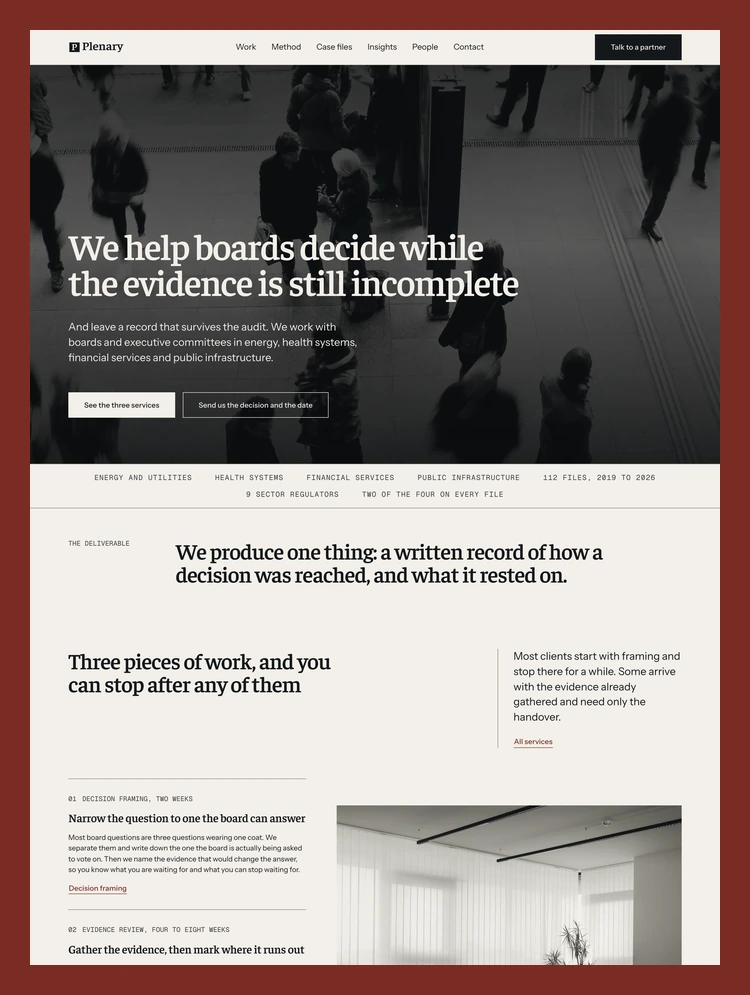
Plenary Advisory is a Webflow template for advisory firms whose clients have to defend their decisions later: boards, executive committees, regulators, auditors, investors. It is written and built for a firm that sells judgement rather than volume, and it looks like one. Serif headlines, hairline rules, twelve columns, no rounded corners and no shadows. The pages read like the documents such a firm would hand over at the end of an engagement, and that is the point of the design: a visitor should be able to tell how carefully you work before they have read a word about your method.
The demo firm is a decision advisory practice working with boards in energy, health systems, financial services and public infrastructure. Every page is written as that firm's real website, with a clear offer, named people, case files that describe what happened and articles that could stand on their own. None of the copy is filler. You can replace it section by section and keep the structure, because each section was written to answer a question a prospective client actually asks: what do you do, how long does it take, who will do the work, what have you done before, and what happens after I write to you.
Plenary is a multi layout template. It ships with three homepages, three About pages and three Contact pages, and all nine share the same type, colour, grid and components, so you can mix them without anything looking borrowed from another template.
The first homepage, The firm, opens on a full bleed photograph with the offer set large over it, a band of sectors and figures, one sentence that states what the firm produces, the three services laid out as chapters with their durations, a row of three case files, the people who will be on the file, recent writing and a contact plate. It is the most complete of the three and suits a firm that wants to say everything on one page.
The second homepage, The record, starts on ink with a question instead of a claim and builds the page around the firm's deliverable: what the finished document contains, the four parts of it, a row of three figures across the full width and the method in stages. It suits a practice whose product is a report, an audit, a valuation or an opinion.
The third homepage, In chapters, is the quietest. It reads top to bottom like a short essay with numbered chapters, a table of the three engagements, five case files, a row of five figures and a closing invitation. It suits a boutique or a single partner practice that would rather be read than scanned.
The three About layouts lead with different things. People first leads with the four people and the partners' backgrounds. Method first opens on the four stages of an engagement. The record opens on the document the firm hands over, carries its contents along a sticky rail that fills as you read, and spells out what a client keeps and who can open the record later. Pick the one that matches how your clients choose you, or keep all three for different audiences.
The Contact layouts are equally distinct. Form and address pairs a full enquiry form with the office details. In steps explains what happens after someone writes, one stage at a time, with a first message form. One question has four fields, and the decision and the date go in one of them. All three forms have labels, focus states, custom success and error messages, and descriptive field names so notifications arrive readable.
Three CMS collections carry the content that changes most often, and each has its own index page and template page.
Case Studies holds the firm's work. The index page lists every file with its sector, where the matter stands now and a short summary, and each case study page tells the story in a fixed order: the engagement, the decision the board faced, what the firm did, what happened next, and the client's own words at the end. A photograph sits beside the work, so a long case never reads as a wall of text.
Insights is the journal. Articles use a long form reading layout with a measured line length, so a long piece stays comfortable to read, and each one ends with a way back to the full archive. The index page separates the latest piece from the archive.
Team holds the people. Each member has a portrait, a role, a biography and the sector they cover, and the People page shows the whole practice with the sector each person leads.
Every collection has sentence case field names with help text, singular slugs, dynamic SEO titles and descriptions, and a share image field for Open Graph, so a new entry is ready for search the moment you publish it.
The build follows Client First by Finsweet from the first class to the last. Page structure uses page wrapper, main wrapper, section, padding global, container and padding section classes. Custom classes are named by component and element with an underscore, variations are combo classes with an is prefix, and utility classes cover spacing, text styles and visibility. Elements rarely carry more than four classes. A buyer who already knows Client First can open the Navigator and find their way immediately, and one who does not can learn it from the Style Guide page.
Every spacing, type and layout value is set in rem through Webflow Variables, and heading sizes step down with each breakpoint through the Typography modes described below. Layouts are set by hand where they actually change: columns stack, full bleed photographs move above their text so a phone shows the whole picture, the case strip becomes a sideways scroll, the navigation turns into Webflow's own Navbar.
Colours, type and layout live in Webflow Variables with names in plain English. A Color Schemes collection has four modes, Base, Ink, Surface and Photo, and every section picks its scheme with a single class, so text, rules, buttons and links on a dark section change together and always meet contrast. Change the paper, the ink or the oxblood accent once and the whole site follows.
Typography has its own collection with modes for tablet, mobile landscape and mobile portrait, so heading sizes step down in proportion rather than by guesswork. The type pairs Faustina for headings with Instrument Sans for text and Geist Mono for labels, figures and the small record marks that give the pages their documentary feel. All three are Google Fonts under the Open Font License.
Twenty interactions are built with Webflow Interactions powered by GSAP, and every one of them is listed by name in the Interactions panel. Headings arrive line by line from under a mask. A single sentence on a page can be read word by word as you scroll. Figures settle digit by digit. Photographs develop in place and drift gently behind the content. Links, rows and case files answer a hover with a small move, a file drawn from a register. A thin rule under the navigation shows how far the page has been read, and the navigation takes the ink ground whenever a dark section passes under it.
Motion is applied by class or custom attribute, so a new section you build joins an animation by carrying the same attribute. Every element is styled into its final position by its class, which means removing an interaction never breaks a layout. For a visitor who asks their system for reduced motion, every animation either completes at once or does not run.
The Instructions page includes the full element map, the values worth changing and what to expect when you change them, and how to remove one animation or all of them.
Text holds a contrast of at least 4.5 to 1 on every ground, including dimmed words at the start of a scroll effect. Every page has one H1 and a heading order without gaps, a skip link to the main content, visible focus styles on every link, button and field, and alt text on every meaningful image. The mobile menu opens from the keyboard, closes with Escape and tells screen readers whether it is open.
Photographs are WebP, cropped to the frames they fill, served through Webflow's responsive images and lazy loaded below the fold. Apart from the font loader Webflow adds for Google Fonts and the review script the Marketplace submission requires, there are no third party scripts, no external embeds, no tracking and no API keys in the project. No page weighs more than three megabytes with its images, styles, scripts and fonts.
The Navbar, Footer and Call To Action Plate are Webflow Components with descriptive names and properties, and a Skip Link component sits at the top of every page. The footer lists all nine layouts in three groups so a buyer can reach every variation from anywhere on the demo.
Alongside the nine layouts and the three CMS templates you get index pages for Case files, Insights and People, a Privacy note and Terms of engagement written for an advisory practice, a designed 404 page, a password page, and four utility pages: Style Guide, Instructions, Licenses and Changelog. The Style Guide shows the type styles, text colours, section grounds, spacing steps and UI elements on one page with the class that produces each.
Plenary fits consulting and advisory firms, board and governance advisers, audit, risk and compliance practices, valuation and transaction advisers, economists, policy consultancies and specialist finance or accounting firms. It also works for any professional practice that wins work on trust: the tone is calm, the structure is deep, and the pages give you room to explain how you think rather than shout about results.
Every photograph is licensed from Unsplash for commercial use and listed on the Licenses page with its source. Fonts are from Google Fonts. Everything you see on the demo is included in the template.
Can only be used by you or one client for one end product. You cannot resell or redistribute this template in its original or modified state.
This template is free to use in both person and commercial projects. You cannot resell, redistribute, or license this template in its original or modified state.
Questions about this template? Just reach out to the template designer and they will get back to you within 2 business days.
For advanced design guidance, please share your questions in the Webflow Forum or reach out to a Webflow Partner.
Share your feedback by leaving a comment below.
For template support, please check the Support tab.

Use the Preview in Designer option to make any edits to the template pages and preview how the layout would fit your content. Changes in preview mode won't be saved.
It isn't possible to apply a template to an already existing project. Instead, you'll need to create a new project based on the Template.
With a Core plan (or higher), you can export sites you build in Webflow, including templates, to host them anywhere you'd like.
Webflow templates are only available for purchase through Workspaces and legacy individual accounts.
CMS templates are designed to use the power of the Webflow CMS. It is possible to downgrade to a Basic Site Plan as long as all CMS content is deleted from the project.
Use the View Connections tool to understand where the CMS content is on the site and delete any dynamic listings and CMS content. We also recommend you to check Components and the Collection page Templates.
Ecommerce templates are designed to use the power of Webflow Ecommerce. It is not possible to remove Ecommerce from a template, however, deleting all Ecommerce Products and Categories from the project, will allow to select a lower Site Plan.
Membership templates are designed to use the power of Webflow Membership. It is not possible to remove Memberships from a template.
.svg)


Reposition and resize items anywhere within the grid to produce powerful, responsive layouts — faster and without code.
Build your lead lists and subscriber base with beautiful forms.
Comes with animations and interactions for additional polish and usability.