Trusted by teams at






MailBloom is a warm Webflow template for email marketing platforms and SaaS teams. Show product features, automations, templates, pricing, integrations, and CMS resources with a clear design built to turn visits into signups.
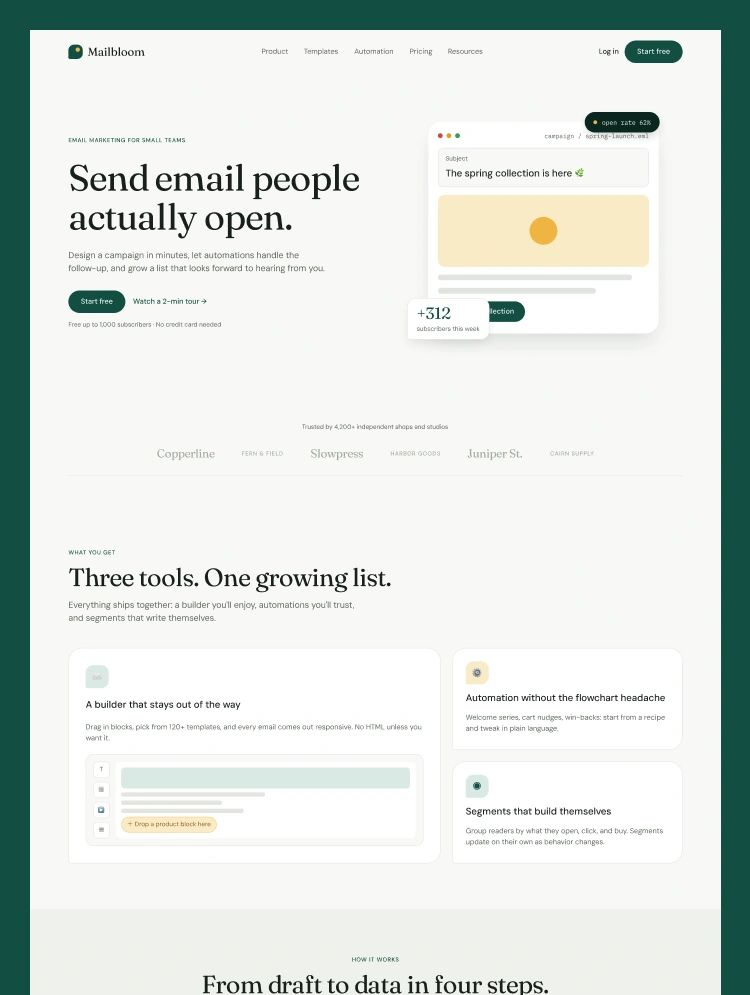
MailBloom is a product-led Webflow template for email marketing apps, automation tools, and SaaS companies. It speaks to small teams without looking small. Deep green, soft yellow, editorial type, and crisp product screens give the site its own recognizable character.
Dedicated pages explain the email builder, campaign templates, audience segments, analytics, and automation tools. Product mockups help visitors understand each feature without reading a wall of technical copy.
The automation page goes deeper with recipes, triggers, timing rules, performance numbers, and easy-to-read workflow examples.
MailBloom includes three pricing levels, monthly and yearly options, a detailed comparison table, FAQs, and clear signup buttons. Free-plan messages appear across the site, giving visitors more than one place to get started.
Customer quotes, integrations, campaign results, and product statistics add useful proof along the way.
The CMS resource section is ready for email tips, product news, guides, and company updates. Posts can be grouped into categories such as deliverability, automation, design, growth, and product news.
Each article has room for an author, date, reading time, introduction, and full post content.
MailBloom includes Home, Product, Templates, Automation, Segments, Pricing, Resources, Guide, API Docs, Status, About, Careers, Contact, Press, CMS Blog Posts, CMS Blog Categories, Privacy Policy, Terms of Service, DPA, and Licenses.
MailBloom works especially well for email platforms, newsletter tools, ecommerce marketing apps, CRM products, audience tools, and automation software. Replace the demo screens and copy with your own product, and the main website structure is already in place.
Can only be used by you or one client for one end product. You cannot resell or redistribute this template in its original or modified state.
This template is free to use in both person and commercial projects. You cannot resell, redistribute, or license this template in its original or modified state.
Questions about this template? Just reach out to the template designer and they will get back to you within 2 business days.
For advanced design guidance, please share your questions in the Webflow Forum or reach out to a Webflow Partner.
Share your feedback by leaving a comment below.
For template support, please check the Support tab.

Use the Preview in Designer option to make any edits to the template pages and preview how the layout would fit your content. Changes in preview mode won't be saved.
It isn't possible to apply a template to an already existing project. Instead, you'll need to create a new project based on the Template.
With a Core plan (or higher), you can export sites you build in Webflow, including templates, to host them anywhere you'd like.
Webflow templates are only available for purchase through Workspaces and legacy individual accounts.
CMS templates are designed to use the power of the Webflow CMS. It is possible to downgrade to a Basic Site Plan as long as all CMS content is deleted from the project.
Use the View Connections tool to understand where the CMS content is on the site and delete any dynamic listings and CMS content. We also recommend you to check Components and the Collection page Templates.
Ecommerce templates are designed to use the power of Webflow Ecommerce. It is not possible to remove Ecommerce from a template, however, deleting all Ecommerce Products and Categories from the project, will allow to select a lower Site Plan.
Membership templates are designed to use the power of Webflow Membership. It is not possible to remove Memberships from a template.
.svg)


Comes with GSAP animations and interactions for additional polish and usability.
Reposition and resize items anywhere within the grid to produce powerful, responsive layouts — faster and without code.
Build your lead lists and subscriber base with beautiful forms.
Comes with animations and interactions for additional polish and usability.