Trusted by teams at






Isak is a dark, single-page Webflow portfolio built for freelance UI designers and no-code developers. One smooth-scrolling site carries a bold intro, an awards and client showcase, an education timeline, a work-highlights gallery, services, a tech-s
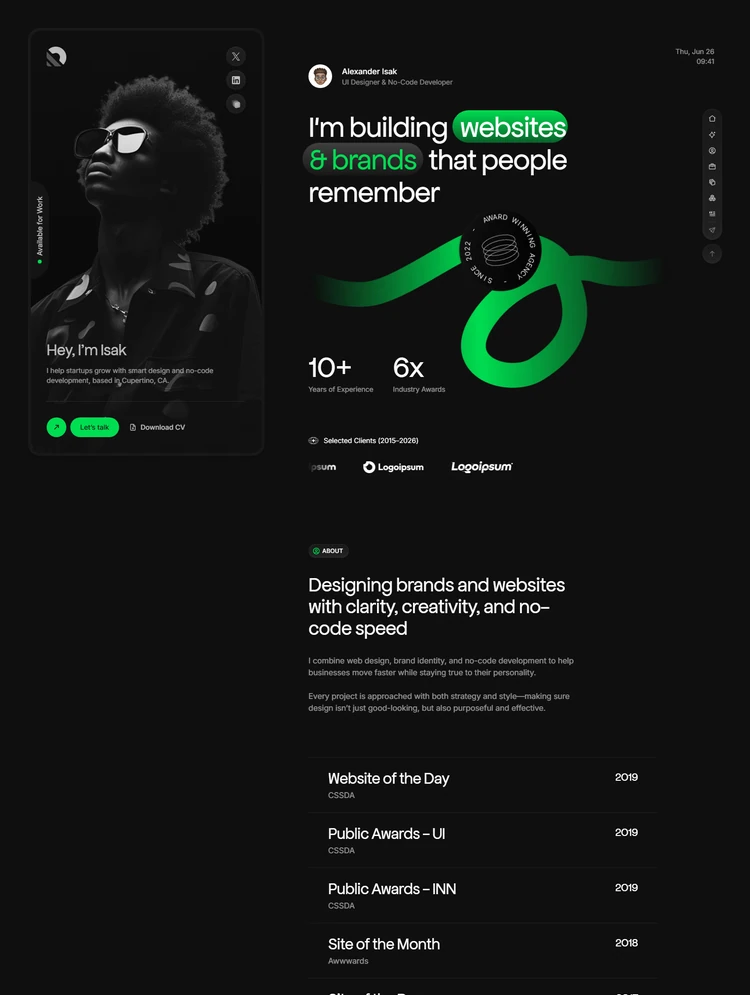
Isak is a premium single-page Webflow template built for freelance UI/UX designers, no-code developers, and independent creative professionals who want a personal site that reads like a real case-study reel instead of a generic "about me" page. The demo is built around a persona, Alexander Isak, a UI designer and no-code developer based in Cupertino, CA, showing exactly how to present recognition, work history, live projects, and services on one scrolling page instead of spreading them across a dozen menu items.
The page opens with a hero introduction ("Hey, I'm Isak"), an "Available for Work" status badge, social links, and Let's Talk / Download CV buttons, backed by a 10+ Years of Experience / 6x Industry Awards stat row and an animated award badge graphic. A Selected Clients logo strip (2015–2026) leads into an About section built around a five-row awards table crediting real recognition formats — CSSDA Website of the Day, CSSDA Public Awards (UI and INN), and Awwwards Site of the Month / Site of the Day — each with its own year.
Below that sits an Education & Experience timeline with three dated roles (2023–Present, 2021–2023, 2019–2021), followed by a Work Highlights gallery of three project cards (Drone, Durotan, NOVA Campaign), each tagged with year, role, and the platform used, and framed as browser-style previews so real case studies drop straight in. A Services section lists Web Design, No-Code Development, and Brand Identity as expandable rows, paired with a Tech Stack section that shows proficiency as percentage bars for tools like Figma, Framer, and Adobe Photoshop.
The Testimonials section leads with 26+ Finalized Projects and 98% Client Satisfaction stats next to a client-photo carousel with pagination, before the page closes on a Contact section with a name/email/project-description form, a direct email link, and a closing quote. Every list on the page — projects, services, testimonials, awards, and team/author entries — is powered by its own Webflow CMS collection, so adding a new case study or testimonial is a drag-and-drop update, not a rebuild.
Isak ships with the utility pages buyers expect from a production-ready template: a Style Guide documenting the template's dark palette (#0f0f0f, #1a1a1a), signature green accent (#00de51), full H1–H6 type scale, and button variants; a Licenses page crediting Freepik, Pexels, and Unsplash for photography and Google Fonts, Font Awesome, and Flaticon for type and icons; a Changelog; and a step-by-step Instructions page covering CMS setup, section-ID navigation, and a pre-launch checklist. Built entirely in native Webflow with anchor-linked sidebar navigation, smooth scrolling, and a dark, high-contrast aesthetic, Isak is fully responsive across desktop, tablet, and mobile.
Can only be used by you or one client for one end product. You cannot resell or redistribute this template in its original or modified state.
This template is free to use in both person and commercial projects. You cannot resell, redistribute, or license this template in its original or modified state.
Questions about this template? Just reach out to the template designer and they will get back to you within 2 business days.
For advanced design guidance, please share your questions in the Webflow Forum or reach out to a Webflow Partner.
Share your feedback by leaving a comment below.
For template support, please check the Support tab.

Use the Preview in Designer option to make any edits to the template pages and preview how the layout would fit your content. Changes in preview mode won't be saved.
It isn't possible to apply a template to an already existing project. Instead, you'll need to create a new project based on the Template.
With a Core plan (or higher), you can export sites you build in Webflow, including templates, to host them anywhere you'd like.
Webflow templates are only available for purchase through Workspaces and legacy individual accounts.
CMS templates are designed to use the power of the Webflow CMS. It is possible to downgrade to a Basic Site Plan as long as all CMS content is deleted from the project.
Use the View Connections tool to understand where the CMS content is on the site and delete any dynamic listings and CMS content. We also recommend you to check Components and the Collection page Templates.
Ecommerce templates are designed to use the power of Webflow Ecommerce. It is not possible to remove Ecommerce from a template, however, deleting all Ecommerce Products and Categories from the project, will allow to select a lower Site Plan.
Membership templates are designed to use the power of Webflow Membership. It is not possible to remove Memberships from a template.
.svg)


Reposition and resize items anywhere within the grid to produce powerful, responsive layouts — faster and without code.
Build your lead lists and subscriber base with beautiful forms.