Trusted by teams at


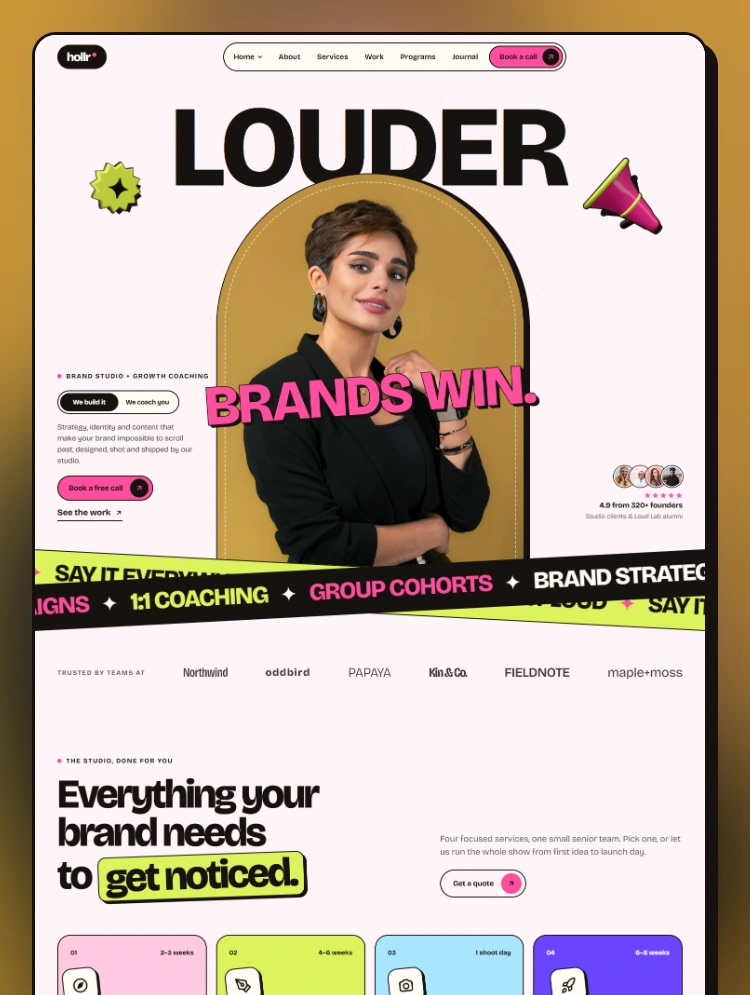
Hollr is a loud, colourful Webflow template designed for creative agencies, brand studios, content teams, business coaches, and consultants.
Hollr is a loud, colourful Webflow template designed for creative agencies, brand studios, content teams, business coaches, and consultants.
With giant headlines, playful 3D stickers, crossed marquee tapes, and bright pink and lime accents, Hollr helps your brand stand out in a crowded feed and turn visitors into booked calls, program sign-ups, and workshop seats.
Hollr works for both the studio that does the work and the coach who teaches it.
The "We Build It / We Coach You" switch in the Home 01 hero allows one business to present both offerings side by side.
Hollr includes two distinct homepage designs, each tailored to a different business model.
Built around a founder portrait and the bold "Louder Brands Win" headline, this layout is ideal for creative studios and agencies.
Designed for coaches and consultants, featuring a next-cohort ticket, a four-step method, and upcoming workshops.
Each homepage includes:
Showcase your expertise and demonstrate the results behind your work.
Each case study page tells the complete project story, including:
The Work page organizes projects into four categories using interactive tabs:
Hollr provides dedicated layouts to promote services, educational programs, and paid experiences.
Each program includes clear pricing and dedicated presentation sections.
Dedicated event pages featuring:
Present studio projects and coaching plans with flexible payment options, including the ability to split any plan into three payments.
Hollr includes four connected CMS collections, each with its own dynamic template page.
Each CMS item includes its own SEO description field, which automatically feeds into the page description and social sharing preview.
Hollr comes with a comprehensive collection of ready-to-use pages.
Hollr combines creative visuals with powerful native Webflow functionality.
Switch the entire website between four colour themes using Webflow Variable Modes:
Fully editable interactions include:
Manage your website's design system from one centralized location.
Reusable Navbar, Footer, and Footer Bottom components allow you to update multiple pages simultaneously.
Every animation respects the visitor's reduced-motion preferences for a more accessible browsing experience.
Fully responsive layouts optimized for:
SEO titles and descriptions are included on every static page and CMS item.
Hollr is designed for creative professionals and businesses looking to build a bold and memorable online presence.
Hollr is built entirely with native Webflow tools, including Variables, Components, CMS Collections, and Interactions.
There is no custom code to maintain.
The included Instructions page guides you through colour moods, typography, components, CMS, stickers, interactions, forms, and images step by step.
Need help setting up or customizing Hollr?
For setup assistance, customization guidance, or any template-related questions, please visit the Support tab.
Can only be used by you or one client for one end product. You cannot resell or redistribute this template in its original or modified state.
This template is free to use in both person and commercial projects. You cannot resell, redistribute, or license this template in its original or modified state.
Questions about this template? Just reach out to the template designer and they will get back to you within 2 business days.
For advanced design guidance, please share your questions in the Webflow Forum or reach out to a Webflow Partner.
Share your feedback by leaving a comment below.
For template support, please check the Support tab.

Use the Preview in Designer option to make any edits to the template pages and preview how the layout would fit your content. Changes in preview mode won't be saved.
It isn't possible to apply a template to an already existing project. Instead, you'll need to create a new project based on the Template.
With a Core plan (or higher), you can export sites you build in Webflow, including templates, to host them anywhere you'd like.
Webflow templates are only available for purchase through Workspaces and legacy individual accounts.
CMS templates are designed to use the power of the Webflow CMS. It is possible to downgrade to a Basic Site Plan as long as all CMS content is deleted from the project.
Use the View Connections tool to understand where the CMS content is on the site and delete any dynamic listings and CMS content. We also recommend you to check Components and the Collection page Templates.
Ecommerce templates are designed to use the power of Webflow Ecommerce. It is not possible to remove Ecommerce from a template, however, deleting all Ecommerce Products and Categories from the project, will allow to select a lower Site Plan.
Membership templates are designed to use the power of Webflow Membership. It is not possible to remove Memberships from a template.


Reposition and resize items anywhere within the grid to produce powerful, responsive layouts — faster and without code.
Build your lead lists and subscriber base with beautiful forms.
Comes with animations and interactions for additional polish and usability.