Trusted by teams at






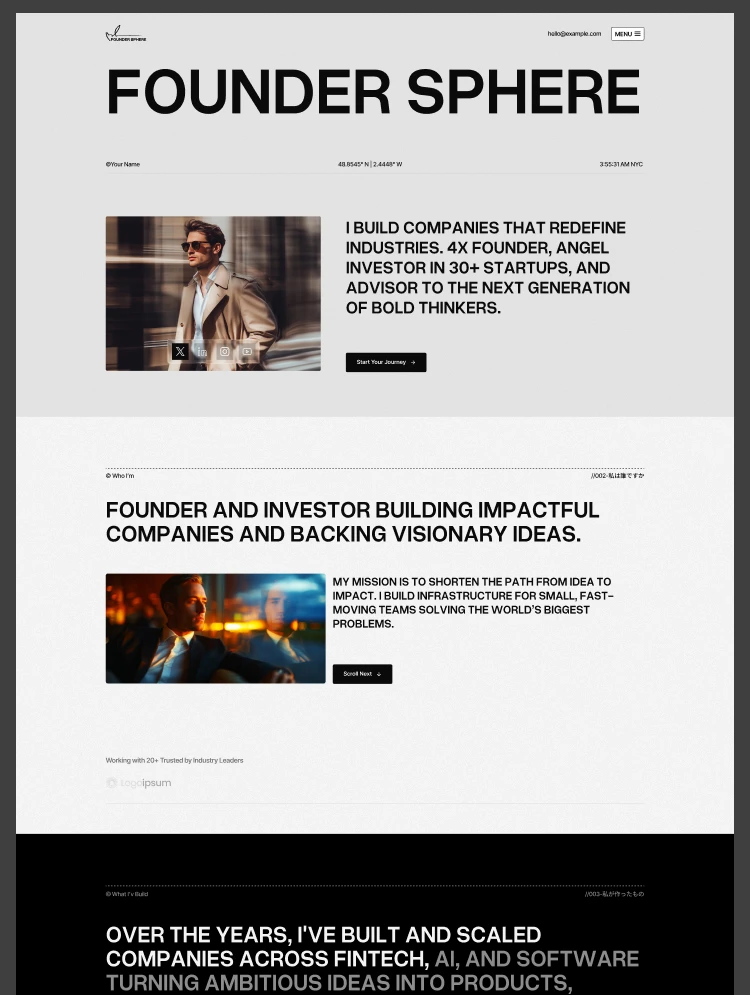
FounderSphere is a Webflow multi-layout personal brand template for founders, investors, and entrepreneurs. Three homepage layouts, venture showcases, CMS-powered content, and dedicated Blog, Podcast, and Thesis pages.
Your personal brand deserves a website as thoughtful and ambitious as your work. FounderSphere is a modern, multi-layout Webflow template built for founders, investors, serial entrepreneurs, freelancers, and agencies who need a professional platform to showcase their story, ventures, insights, and expertise.
Three complete homepage layouts, multiple About and Contact variations, a CMS-powered Ventures and Blog system, Podcast and Thesis pages, and a complete collection of inner and utility pages give you everything you need to build a distinctive personal brand website. All layouts share a unified design system, reusable components, and a flexible variable system, making it easy to choose one direction or combine elements across the template.
It is designed for founders building a personal brand, investors presenting their portfolio and thesis, serial entrepreneurs showcasing multiple ventures, consultants and advisors highlighting their expertise, and agencies or independent professionals who need a polished, credible digital presence.
Total pages: 20 +
Homepage layouts: 3 (Investor, Founder, and Serial Entrepreneur)
About pages: 3 variations
Contact pages: 3 variations
CMS collections: Dynamic content for Ventures, Blog, and related content
Reusable components: 50+ modern and accessible components
Animations: Smooth interactions, scroll effects, entrance animations, and micro-interactions
Newsletter: Yes, with built-in email signup section
Contact or enquiry form: Yes
Online store: No
Responsive: Desktop, tablet, and mobile breakpoints
Design system: Global variables, reusable components, and consistent styling
Utility pages: Style Guide, Instructions, Changelog, Licenses, 404, Password Protected
Homepage layouts
Home A - Investor (investment philosophy, portfolio, and expertise)
Home B - Founder (personal story, ventures, and achievements)
Home C - Serial Entrepreneur (multiple ventures, experience, and insights)
About pages
About A - Investor
About B - Founder
About C - Serial Entrepreneur
Contact pages
Contact A - Investor
Contact B - Founder
Contact C - Serial Entrepreneur
Main pages
Ventures
Venture Details
Blog
Blog Details
Podcast
Thesis
Utility pages
Style Guide
Instructions
Changelog
Licenses
404 Error
Privacy Policy
Terms & Conditions
Password Protected
Three layouts: Choose one or build your own combination
FounderSphere is designed differently from a standard single-purpose portfolio template. The three homepage layouts are built around different professional identities: Investor, Founder, and Serial Entrepreneur. You can choose the layout that best represents your work or combine sections and pages to create a more personalized experience.
All three layouts share the same design system, variables, components, and content architecture, so switching between styles or adapting sections is straightforward.
Investor: Built for investment professionals
The Investor layout gives you a polished platform for presenting your investment approach, portfolio, experience, and professional perspective. It is ideal for venture capitalists, angel investors, fund managers, and investment professionals building a strong personal presence.
Founder: Built for ambitious builders
The Founder layout focuses on your personal story, experience, achievements, and the businesses you are building. It gives founders a clear way to communicate what they do, what they believe in, and where they are going next.
Serial Entrepreneur: Built for multiple ventures
Designed for entrepreneurs working across multiple businesses and projects. The layout provides space to present different ventures, share your experience, publish insights, and build a cohesive personal brand around everything you are working on.
Showcase ventures with dynamic content
The Ventures section gives you a dedicated space to showcase businesses, investments, and projects. Each venture can link to its own detailed page, making it easy to present individual companies or initiatives without rebuilding the layout each time.
CMS-powered blog
Publish articles, ideas, opinions, and professional insights through Webflow CMS. New posts can be added directly through the CMS and automatically appear across relevant blog sections and listings.
Podcast ready content system
FounderSphere includes a dedicated Podcast page for sharing episodes, conversations, interviews, and long-form discussions. Use it to turn your website into a central hub for your audio content and thought leadership.
Dedicated thesis page
The Thesis page gives investors and founders a place to communicate the principles, ideas, and beliefs that guide their decisions. It can be used for an investment thesis, business philosophy, market perspective, or personal point of view.
Newsletter section for audience growth
A built-in newsletter signup helps you turn website visitors into an ongoing audience. Use it to share founder dispatches, portfolio updates, new articles, podcast episodes, or ideas from your work.
50+ reusable components
FounderSphere includes more than 50 reusable components designed with Webflow best practices. Build new pages faster by combining existing sections instead of starting every layout from scratch.
Variable-powered customization
The template uses a clean variable system for global design control. Update brand colors, typography, spacing, and other visual settings from one place to maintain consistency throughout the entire website.
Responsive across every breakpoint
Every page and component is designed to work across desktop, tablet, and mobile screen sizes, giving your personal brand a consistent experience on every device.
Built with performance and SEO in mind
FounderSphere uses semantic HTML, optimized assets, responsive layouts, and structured content to provide a strong foundation for performance and search visibility.
FounderSphere provides the structure and tools for presenting your personal brand, ventures, content, and professional experience, but it does not manage your investment operations, portfolio reporting, financial transactions, fundraising, CRM, podcast hosting, or newsletter delivery.
You remain responsible for the accuracy of your professional claims, investment information, financial disclosures, business data, and published content.
Ventures, blog posts, and other dynamic content can be managed through Webflow CMS. Adding a new venture, publishing an article, or updating your content can be done directly through the CMS without rebuilding the underlying design.
The template's variable system makes global customization straightforward. Change your colors, typography, and spacing from the design system and keep the entire website visually consistent.
You can also combine sections from the three homepage variations to create a unique personal-brand experience that fits your specific goals.
If you would rather not do it yourself, our team can customize this template for you, from color and content changes through to new pages and custom functionality. Request a Webflow template customization quote, or explore our Webflow customization service.
Can I use just one of the four layouts without the others?
Yes. Each layout functions as a complete, standalone website.
Can I combine multiple layouts under one domain?
Yes. All layouts share the same design system and CMS, allowing you to seamlessly combine them.
How are solutions organized?
Through a CMS collection. Adding a new solution with its own dedicated page requires just a simple CMS entry.
How are projects organized?
Via a CMS collection that tracks key metrics like energy output and carbon reduction, linking directly to full case studies.
Is the Figma file included?
Yes. Email your purchase receipt to cs@tncflow.com to receive it.
Are the animations editable?
Yes. All animations can be fully adjusted or disabled directly within the Webflow Designer.
Support and ongoing updates are included. If you need help customizing FounderSphere, setting up the CMS, modifying layouts, or adapting the template to your personal brand, reach out after purchase for assistance.
Can only be used by you or one client for one end product. You cannot resell or redistribute this template in its original or modified state.
This template is free to use in both person and commercial projects. You cannot resell, redistribute, or license this template in its original or modified state.
Questions about this template? Just reach out to the template designer and they will get back to you within 2 business days.
For advanced design guidance, please share your questions in the Webflow Forum or reach out to a Webflow Partner.
Share your feedback by leaving a comment below.
For template support, please check the Support tab.

Use the Preview in Designer option to make any edits to the template pages and preview how the layout would fit your content. Changes in preview mode won't be saved.
It isn't possible to apply a template to an already existing project. Instead, you'll need to create a new project based on the Template.
With a Core plan (or higher), you can export sites you build in Webflow, including templates, to host them anywhere you'd like.
Webflow templates are only available for purchase through Workspaces and legacy individual accounts.
CMS templates are designed to use the power of the Webflow CMS. It is possible to downgrade to a Basic Site Plan as long as all CMS content is deleted from the project.
Use the View Connections tool to understand where the CMS content is on the site and delete any dynamic listings and CMS content. We also recommend you to check Components and the Collection page Templates.
Ecommerce templates are designed to use the power of Webflow Ecommerce. It is not possible to remove Ecommerce from a template, however, deleting all Ecommerce Products and Categories from the project, will allow to select a lower Site Plan.
Membership templates are designed to use the power of Webflow Membership. It is not possible to remove Memberships from a template.
.svg)


Comes with GSAP animations and interactions for additional polish and usability.
Reposition and resize items anywhere within the grid to produce powerful, responsive layouts — faster and without code.
Build your lead lists and subscriber base with beautiful forms.
Comes with animations and interactions for additional polish and usability.