Trusted by teams at


Falxcon is a single-page Webflow template for falconry clubs, heritage societies, and membership organizations, with sections for events, membership benefits, conservation, and a photo gallery.
🦅 Falxcon — Falconry Club & Heritage Organization Webflow Template
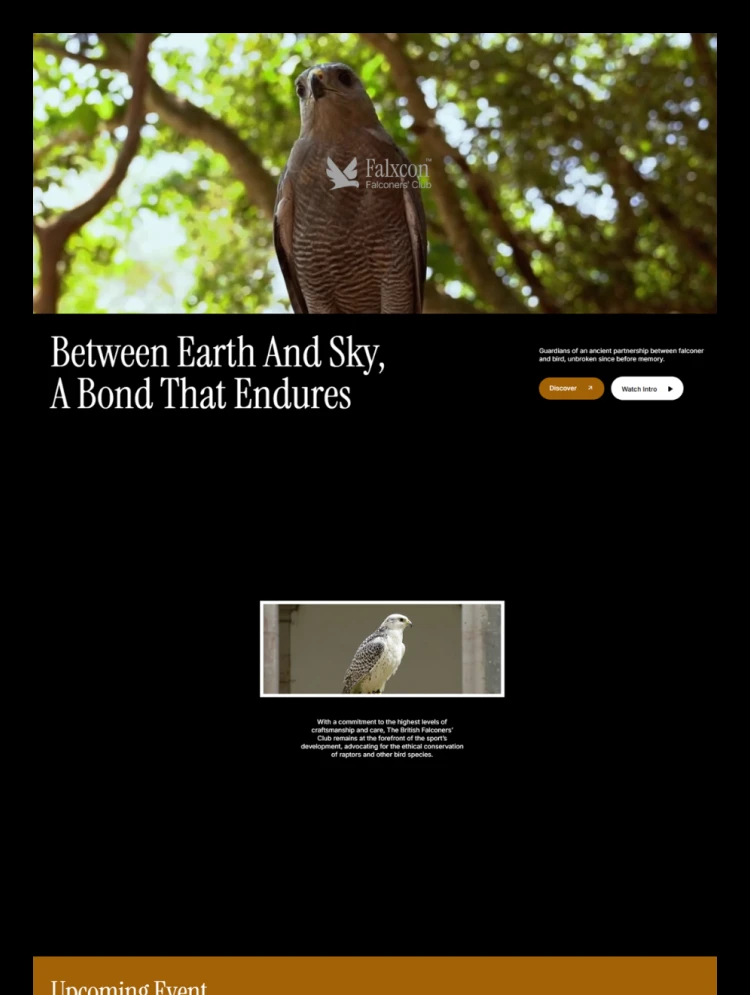
Build a distinguished online presence with Falxcon, a premium Webflow template crafted for falconry clubs, heritage societies, conservation groups, and membership-based organizations. Combining a deep forest green and warm gold palette with elegant serif typography, Falxcon helps you share your story, host your events, and welcome new members through a refined, single-page website.
🦅 Cinematic Hero Section
Open with a bold headline, a supporting statement, and a “Watch Intro” video that introduces your organization with atmosphere and authority.
📜 Heritage & Mission Intro
Tell the story of your club, its values, and its commitment to tradition through a clean, well-spaced introduction section.
📅 Upcoming Events
Promote field meets, gatherings, and annual meetings with event cards that show the date, location, and a short description, with a clear call to action for more information.
🏅 Membership Benefits
Present what members receive, from insurance cover to mentorship programmes, in a structured list paired with simple, recognizable icons.
🌿 Conservation Section
Highlight species recovery, habitat stewardship, and research work to show the purpose behind your organization.
🖼️ Heritage Gallery
Showcase your birds and your members in an asymmetrical image grid that gives photography room to stand out.
📬 Join & Contact Section
Close with a clear invitation to join, along with your chapter locations and contact details in a well-organized footer.
📱 100% Responsive
Every section is optimized for desktop, tablet, and mobile devices.
🎨 Fully Customizable & Production Ready
🎨 Global Style Guide
Adjust colors, typography, spacing, buttons, and reusable elements from one place.
🧩 Reusable Components
Built with clean class naming and consistent components for faster customization.
🚀 SEO Friendly
Semantic structure, a clear heading hierarchy, and customizable meta settings help your site load fast and be found more easily.
🏠 Home (single page with Hero, Intro, Events, Benefits, Conservation, Gallery, and Join sections)
🎨 Style Guide
📖 Instructions
📋 Licenses
📝 Changelog
Can only be used by you or one client for one end product. You cannot resell or redistribute this template in its original or modified state.
This template is free to use in both person and commercial projects. You cannot resell, redistribute, or license this template in its original or modified state.
Questions about this template? Just reach out to the template designer and they will get back to you within 2 business days.
For advanced design guidance, please share your questions in the Webflow Forum or reach out to a Webflow Partner.
Share your feedback by leaving a comment below.
For template support, please check the Support tab.

Use the Preview in Designer option to make any edits to the template pages and preview how the layout would fit your content. Changes in preview mode won't be saved.
It isn't possible to apply a template to an already existing project. Instead, you'll need to create a new project based on the Template.
With a Core plan (or higher), you can export sites you build in Webflow, including templates, to host them anywhere you'd like.
Webflow templates are only available for purchase through Workspaces and legacy individual accounts.
CMS templates are designed to use the power of the Webflow CMS. It is possible to downgrade to a Basic Site Plan as long as all CMS content is deleted from the project.
Use the View Connections tool to understand where the CMS content is on the site and delete any dynamic listings and CMS content. We also recommend you to check Components and the Collection page Templates.
Ecommerce templates are designed to use the power of Webflow Ecommerce. It is not possible to remove Ecommerce from a template, however, deleting all Ecommerce Products and Categories from the project, will allow to select a lower Site Plan.
Membership templates are designed to use the power of Webflow Membership. It is not possible to remove Memberships from a template.


Comes with GSAP animations and interactions for additional polish and usability.
Reposition and resize items anywhere within the grid to produce powerful, responsive layouts — faster and without code.
Build your lead lists and subscriber base with beautiful forms.
Comes with animations and interactions for additional polish and usability.