Trusted by teams at






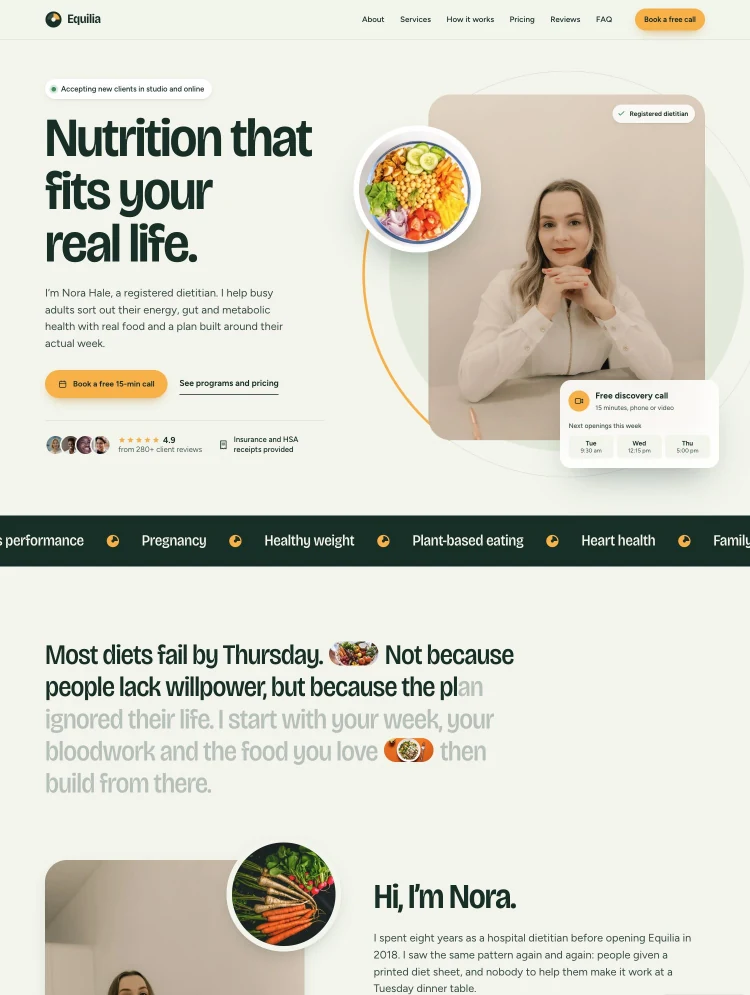
Equilia is a Webflow template for nutrition practices, with an editorial layout, clear program pricing, practitioner profiles and a native inquiry form to introduce your approach and invite new inquiries.
Equilia is a one-page Webflow template for dietitians, nutritionists and small nutrition practices. An ivory background, deep green sections, amber calls to action and expressive typography give the site a clear, personal character.
Introduce your practitioner and present six areas of nutrition care in a varied service grid. A four-step process explains the journey from discovery call to ongoing support. Dedicated sections for credentials, team profiles, client stories and studio photography give you space to present the people and setting behind your practice.
Compare programs through upfront and monthly pricing tabs, then answer common questions with native FAQ accordions. The inquiry form collects contact details, goals and meeting preferences. A dedicated Thank You page provides confirmation and a link back to a fresh form.
Edit recurring navigation, footer, call-to-action and submit buttons through reusable Webflow components. Variables organize colors, typography and shared sizes, while the Style Guide brings visual and form examples together. Instructions explain the page structure and the editable parts of the native interactions, including the stacked Process cards.
Commercial content is managed directly in the Designer. Replace the demonstration content with your own services, photographs and contact details, and configure form notifications before launch. Bricolage Grotesque and Figtree provide the template’s display and body typography.
Home, Style Guide, Instructions, Changelog, Licenses, demo Privacy and Terms, a custom 404 page and Thank You.
Can only be used by you or one client for one end product. You cannot resell or redistribute this template in its original or modified state.
This template is free to use in both person and commercial projects. You cannot resell, redistribute, or license this template in its original or modified state.
Questions about this template? Just reach out to the template designer and they will get back to you within 2 business days.
For advanced design guidance, please share your questions in the Webflow Forum or reach out to a Webflow Partner.
Share your feedback by leaving a comment below.
For template support, please check the Support tab.

Use the Preview in Designer option to make any edits to the template pages and preview how the layout would fit your content. Changes in preview mode won't be saved.
It isn't possible to apply a template to an already existing project. Instead, you'll need to create a new project based on the Template.
With a Core plan (or higher), you can export sites you build in Webflow, including templates, to host them anywhere you'd like.
Webflow templates are only available for purchase through Workspaces and legacy individual accounts.
CMS templates are designed to use the power of the Webflow CMS. It is possible to downgrade to a Basic Site Plan as long as all CMS content is deleted from the project.
Use the View Connections tool to understand where the CMS content is on the site and delete any dynamic listings and CMS content. We also recommend you to check Components and the Collection page Templates.
Ecommerce templates are designed to use the power of Webflow Ecommerce. It is not possible to remove Ecommerce from a template, however, deleting all Ecommerce Products and Categories from the project, will allow to select a lower Site Plan.
Membership templates are designed to use the power of Webflow Membership. It is not possible to remove Memberships from a template.


Reposition and resize items anywhere within the grid to produce powerful, responsive layouts — faster and without code.
Build your lead lists and subscriber base with beautiful forms.
Comes with animations and interactions for additional polish and usability.