Trusted by teams at






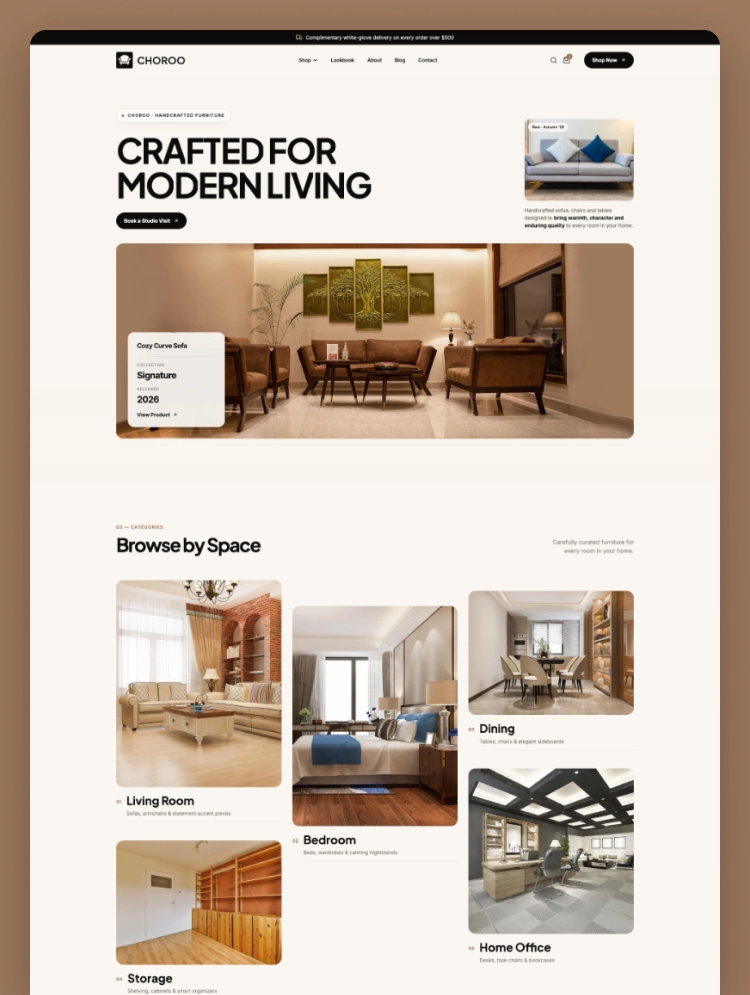
Choroo is a modern furniture website template built for stylish online furniture businesses. It helps brands present products with clean layouts and strong visual storytelling. You can build a polished furniture store without starting from scratch.
Choroo is a flexible furniture Webflow template built for modern furniture businesses and home furnishing brands. Spacious layouts and large product imagery help each item stand out without making pages feel crowded. The design gives stores a polished way to present products, collections, and brand stories.
Visitors can browse furniture by room and explore products through carefully organized collections. Dedicated layouts support living rooms, bedrooms, dining areas, storage spaces, and home offices. This structure makes product discovery easier for customers with different furnishing needs.
As a furniture ecommerce website template, Choroo includes the essential structure for online product sales. Webflow Ecommerce supports product pages, categories, checkout, and order confirmation experiences. Webflow CMS also helps manage blog posts, authors, categories, collections, and other dynamic content.
Best for: Choroo works well for furniture stores, showrooms, home decor brands, and online retailers. It also suits furniture manufacturers, interior businesses, handmade furniture sellers, and modern furnishing brands.
Choroo includes 20 pages and template layouts covering important shopping and brand experiences. Core pages include Home, About Us, Shop, Blog, Contact Us, and product templates. Curated Collections and Room Categories help visitors explore products through organized visual browsing.
The eCommerce structure includes product categories, checkout, PayPal checkout, and order confirmation pages. Blog templates support posts, authors, and categories for publishing guides, ideas, and brand stories. Password and 404 pages complete the website structure needed for a professional launch.
Choroo combines clean visual design with practical features for presenting and selling furniture online. Its layouts keep products at the center while supporting collections, room categories, and editorial content. Responsive design also helps visitors browse comfortably across desktop, tablet, and mobile devices.
Webflow CMS makes it easier to manage changing content as your business grows. Ecommerce pages provide the core structure needed to guide customers from browsing to checkout. Choroo gives furniture brands a flexible starting point for building a professional online presence.
Choroo uses spacious layouts, strong imagery, and clean typography to showcase furniture products clearly. Its visual style helps brands create a refined shopping experience without unnecessary distractions.
Every layout adapts smoothly across desktop, tablet, mobile, and other common screen sizes. Visitors can browse products and collections comfortably from whichever device they choose.
You can update colors, typography, images, products, sections, and other visual elements. Webflow makes these changes easier without requiring advanced coding or development knowledge.
The CMS supports blog posts, authors, categories, curated collections, and room-based content. This structure makes ongoing updates more organized as your website continues to grow.
Choroo includes product pages, category layouts, checkout screens, and order confirmation pages. These elements provide the essential structure needed for selling furniture through your website.
The clean layout keeps unnecessary visual elements to a minimum across important pages. This helps create a smoother browsing experience for visitors moving through the store.
The template uses a clear content structure with organized headings and readable page layouts. You can also edit titles, descriptions, image details, and other SEO settings inside Webflow.
Static Pages:
Home
About Us
Blog
Shop
Contact Us
Style Guide
Changelog
Licenses
CMS Collection Pages:
Curated Collections Template
Room Categories Template
Blog Categories Template
Blog Posts Template
Blog Authors Template
Ecommerce Pages:
Products Template
Categories Template
Checkout
Checkout (PayPal)
Order Confirmation
Utility Pages:
Password
404
Can only be used by you or one client for one end product. You cannot resell or redistribute this template in its original or modified state.
This template is free to use in both person and commercial projects. You cannot resell, redistribute, or license this template in its original or modified state.
Questions about this template? Just reach out to the template designer and they will get back to you within 2 business days.
For advanced design guidance, please share your questions in the Webflow Forum or reach out to a Webflow Partner.
Share your feedback by leaving a comment below.
For template support, please check the Support tab.

Use the Preview in Designer option to make any edits to the template pages and preview how the layout would fit your content. Changes in preview mode won't be saved.
It isn't possible to apply a template to an already existing project. Instead, you'll need to create a new project based on the Template.
With a Core plan (or higher), you can export sites you build in Webflow, including templates, to host them anywhere you'd like.
Webflow templates are only available for purchase through Workspaces and legacy individual accounts.
CMS templates are designed to use the power of the Webflow CMS. It is possible to downgrade to a Basic Site Plan as long as all CMS content is deleted from the project.
Use the View Connections tool to understand where the CMS content is on the site and delete any dynamic listings and CMS content. We also recommend you to check Components and the Collection page Templates.
Ecommerce templates are designed to use the power of Webflow Ecommerce. It is not possible to remove Ecommerce from a template, however, deleting all Ecommerce Products and Categories from the project, will allow to select a lower Site Plan.
Membership templates are designed to use the power of Webflow Membership. It is not possible to remove Memberships from a template.
.svg)


Reposition and resize items anywhere within the grid to produce powerful, responsive layouts — faster and without code.
Build your lead lists and subscriber base with beautiful forms.
Comes with animations and interactions for additional polish and usability.