Trusted by teams at






Aqiora is a digital banking and fintech website template built with Webflow. It showcases money management features like savings goals, spending insights, card controls, currency exchange, and app integrations.
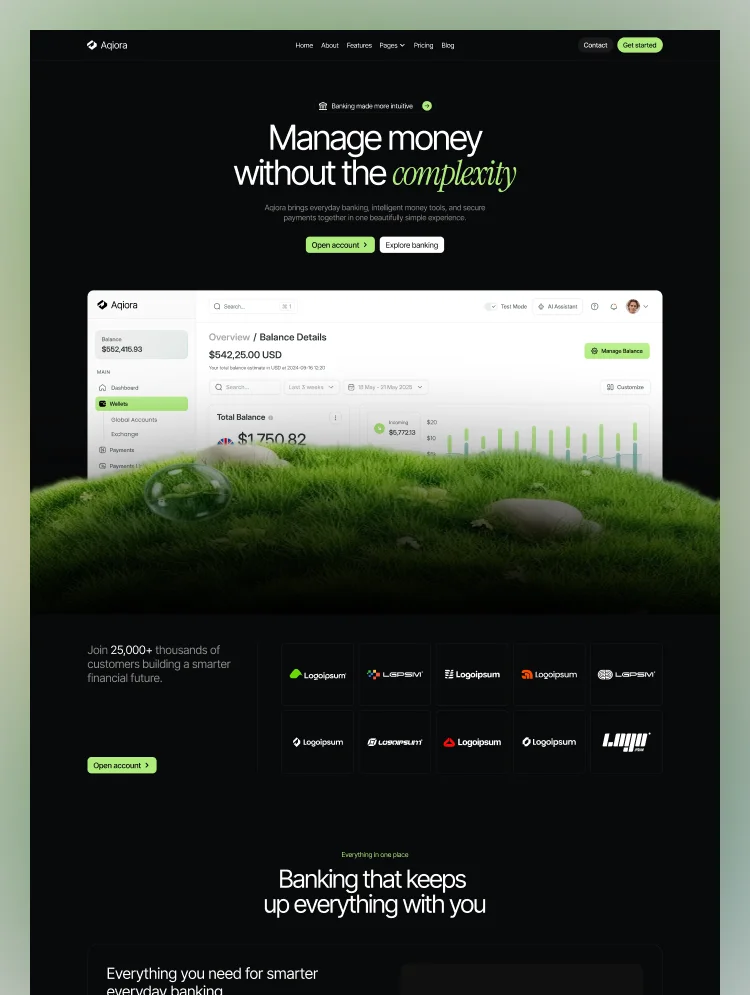
Aqiora is a modern banking website template built on Webflow for financial products that need to feel simple and trustworthy at the same time. A dark interface with fresh lime accents and dashboard-style UI cards presents mobile banking, payments, and money management features with clarity.
Dedicated sections cover cashflow tracking, savings goals, multi-card management, currency exchange, and international money transfers. A features page, customer stories with measurable outcomes, and FAQ blocks on every contact layout help visitors understand the product before they sign up.
An integrations directory with category filters shows how the app connects to other financial tools, while a blog with five topic tabs builds authority. Three pricing tiers with a monthly and yearly toggle make this fintech Webflow template ready to sell subscription banking plans.
Best for: This digital banking website template is best for financial products of every size. It is perfect for neobanks and challenger banks, fintech startups, personal finance apps, budgeting apps, savings and expense trackers, payment and money transfer apps, business banking products, and financial SaaS platforms.
This template has a total of 23 pages, including 13 static pages, 2 CMS collection pages, and 8 utility pages. It provides 3 homepage layouts, 3 about layouts, and 3 contact layouts, plus dedicated pages for features, pricing, blog, and integrations.
Each page supports a step in the fintech customer journey. The features page explains spending, saving, investing, and payment tools in depth. Integration Single pages describe each connected service with an overview and key capabilities, and Blog Single pages share practical money tips. About layouts tell the company story through milestones, stats, and team profiles.
This bank website template is built around what fintech customers look for before opening an account: clear features, transparent pricing, proof from real users, and answers to security questions. Dashboard previews, customer stories, and on-page FAQs give each of those a home.
Three homepage, about, and contact layouts let one template present a consumer banking app, a business account, or a money management platform differently. The integrations directory and subscription pricing help growing fintech brands show how their product fits into a customer's financial life.
Dashboard-Led Fintech Design
A dark interface with lime accents and product-style UI cards for cashflow, savings, and cards that makes a banking brand look modern and app-ready on first view.
Mobile Responsive
Layouts are styled for desktop, tablet, and both mobile breakpoints, plus large 1920px screens, so customers see a clean experience on any device.
GSAP Motion & Smooth Scroll
Marquees, animated counters, a pill-drop animation, and smooth scrolling add polish. Each custom interaction is documented on the Instructions page.
Three Layouts per Key Page
Home, About, and Contact each come in three distinct layouts, so you can match a consumer app, a business product, or a growth-stage fintech without redesigning.
Built in Webflow CMS
Blog and Integrations collections, each with category filter tabs, let you publish articles and add new connected services without touching code.
SEO-Ready Structure
Every page ships with its own meta title and description, one H1 heading, and clean slugs such as /features and /pricing, giving a solid base for organic search.
STATIC PAGES · 13
CMS COLLECTION PAGES · 2
UTILITY PAGES · 8
Can only be used by you or one client for one end product. You cannot resell or redistribute this template in its original or modified state.
This template is free to use in both person and commercial projects. You cannot resell, redistribute, or license this template in its original or modified state.
Questions about this template? Just reach out to the template designer and they will get back to you within 2 business days.
For advanced design guidance, please share your questions in the Webflow Forum or reach out to a Webflow Partner.
Share your feedback by leaving a comment below.
For template support, please check the Support tab.

Use the Preview in Designer option to make any edits to the template pages and preview how the layout would fit your content. Changes in preview mode won't be saved.
It isn't possible to apply a template to an already existing project. Instead, you'll need to create a new project based on the Template.
With a Core plan (or higher), you can export sites you build in Webflow, including templates, to host them anywhere you'd like.
Webflow templates are only available for purchase through Workspaces and legacy individual accounts.
CMS templates are designed to use the power of the Webflow CMS. It is possible to downgrade to a Basic Site Plan as long as all CMS content is deleted from the project.
Use the View Connections tool to understand where the CMS content is on the site and delete any dynamic listings and CMS content. We also recommend you to check Components and the Collection page Templates.
Ecommerce templates are designed to use the power of Webflow Ecommerce. It is not possible to remove Ecommerce from a template, however, deleting all Ecommerce Products and Categories from the project, will allow to select a lower Site Plan.
Membership templates are designed to use the power of Webflow Membership. It is not possible to remove Memberships from a template.
.svg)


Comes with GSAP animations and interactions for additional polish and usability.
Reposition and resize items anywhere within the grid to produce powerful, responsive layouts — faster and without code.
Build your lead lists and subscriber base with beautiful forms.
Comes with animations and interactions for additional polish and usability.