Trusted by teams at






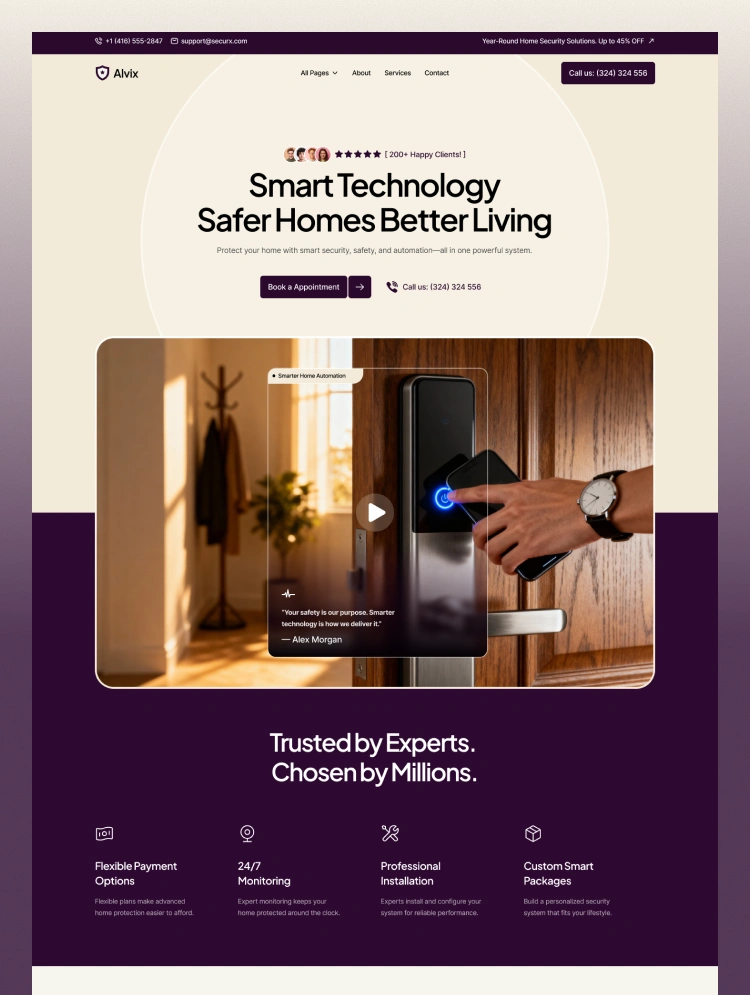
Alvix is a modern Webflow template designed for smart home security, automation, CCTV, access control, and home protection businesses. With a clean, technology-focused design, Alvix helps showcase security solutions, services, projects, and expertise
Alvix is a digital smart home security template created for security companies, home automation providers, and smart technology businesses. Its professional design makes it easy to present connected security solutions, monitoring systems, smart access, sensors, and home automation services.
The template includes dedicated sections for services, projects, testimonials, FAQs, and security solutions. It also features structured layouts for showcasing individual services, project details, and blog content, helping businesses build trust and communicate their expertise clearly.
Built with Webflow, Alvix is fully responsive and easy to customize without coding. Its clean layouts, technology-focused visual style, and conversion-ready sections make it a strong foundation for launching a professional smart security website.
Need help setting up or customizing Alvix?
Our friendly support team is always ready to help.
Email us at hello@mezario.com, and we’ll get back to you within 24 hours.
Can only be used by you or one client for one end product. You cannot resell or redistribute this template in its original or modified state.
This template is free to use in both person and commercial projects. You cannot resell, redistribute, or license this template in its original or modified state.
Questions about this template? Just reach out to the template designer and they will get back to you within 2 business days.
For advanced design guidance, please share your questions in the Webflow Forum or reach out to a Webflow Partner.
Share your feedback by leaving a comment below.
For template support, please check the Support tab.

Use the Preview in Designer option to make any edits to the template pages and preview how the layout would fit your content. Changes in preview mode won't be saved.
It isn't possible to apply a template to an already existing project. Instead, you'll need to create a new project based on the Template.
With a Core plan (or higher), you can export sites you build in Webflow, including templates, to host them anywhere you'd like.
Webflow templates are only available for purchase through Workspaces and legacy individual accounts.
CMS templates are designed to use the power of the Webflow CMS. It is possible to downgrade to a Basic Site Plan as long as all CMS content is deleted from the project.
Use the View Connections tool to understand where the CMS content is on the site and delete any dynamic listings and CMS content. We also recommend you to check Components and the Collection page Templates.
Ecommerce templates are designed to use the power of Webflow Ecommerce. It is not possible to remove Ecommerce from a template, however, deleting all Ecommerce Products and Categories from the project, will allow to select a lower Site Plan.
Membership templates are designed to use the power of Webflow Membership. It is not possible to remove Memberships from a template.
.svg)


Comes with GSAP animations and interactions for additional polish and usability.
Reposition and resize items anywhere within the grid to produce powerful, responsive layouts — faster and without code.
Build your lead lists and subscriber base with beautiful forms.
Comes with animations and interactions for additional polish and usability.