Trusted by teams at


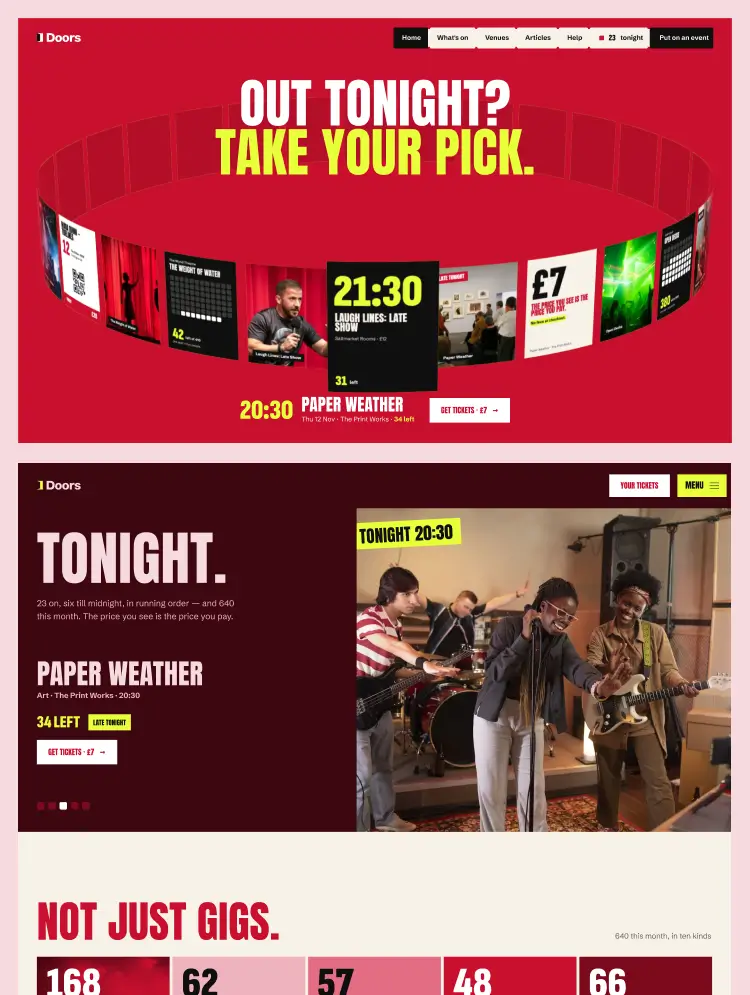
A bold, red-led ticketing website for venues, festivals, promoters and city guides: what's on by day and kind, an event page for every ticket state, venues, organisers and articles, all from the CMS.
Admit is a website template for anyone who sells tickets to what's on in a city: venues, festivals, promoters, ticketing start-ups and city guides. The demo lists a week of nights out in Glasgow, from gigs and comedy to theatre, workshops, club nights and markets.
## Built to sell tickets
- An event page for every ticket state: on sale, few left, sold out with a waitlist, free entry and on sale soon, with up to three ticket types and their prices all-in.
- Get tickets goes to each event's own ticket link, so any box office or ticketing provider works.
- What's on by day and by kind, with tonight's picks and Going fast on the homepages.
- A Create an event form for organisers, and the fees explained on a page of their own.
- Checkout, Sign in and Your tickets pages, designed and ready to connect to your provider.
## Pages
- 4 homepages
- What's On in 3 layouts and the event page in 4; Kind, Venues, Venue, Organiser, Articles, Article, Help and Put on an event in 2 each
- Fees, Create an event, About, Contact, Terms, Privacy, Checkout, Sign in and Your tickets
- Style Guide, Instructions, Licenses, Changelog, 404 and Password
## CMS
Five collections linked by references: Events, Kinds, Venues, Organisers and Articles. Add an event once and it appears on its kind's, venue's and organiser's pages, in the lists and on the homepages. Every field has help text.
## Design system and motion
- Variables for every colour, type size, space and corner, with breakpoint modes and five colour grounds
- Components: Navbar (five variants), Navbar Minimal, Footer, Button (six variants) and Ways In
- Google fonts: Anton, Schibsted Grotesk and Sofia Sans Extra Condensed
- GSAP animations, documented step by step on the Instructions page: a 3D ring of tonight's events, reels that pick a night for you, doors that open as you scroll, a follow spot over the seats, titles that rise line by line and figures that count up. Reduced-motion settings are respected.
- Lighthouse 100 for accessibility, best practices and SEO, with menus that work from the keyboard.
Can only be used by you or one client for one end product. You cannot resell or redistribute this template in its original or modified state.
This template is free to use in both person and commercial projects. You cannot resell, redistribute, or license this template in its original or modified state.
Questions about this template? Just reach out to the template designer and they will get back to you within 2 business days.
For advanced design guidance, please share your questions in the Webflow Forum or reach out to a Webflow Partner.
Share your feedback by leaving a comment below.
For template support, please check the Support tab.

Use the Preview in Designer option to make any edits to the template pages and preview how the layout would fit your content. Changes in preview mode won't be saved.
It isn't possible to apply a template to an already existing project. Instead, you'll need to create a new project based on the Template.
With a Core plan (or higher), you can export sites you build in Webflow, including templates, to host them anywhere you'd like.
Webflow templates are only available for purchase through Workspaces and legacy individual accounts.
CMS templates are designed to use the power of the Webflow CMS. It is possible to downgrade to a Basic Site Plan as long as all CMS content is deleted from the project.
Use the View Connections tool to understand where the CMS content is on the site and delete any dynamic listings and CMS content. We also recommend you to check Components and the Collection page Templates.
Ecommerce templates are designed to use the power of Webflow Ecommerce. It is not possible to remove Ecommerce from a template, however, deleting all Ecommerce Products and Categories from the project, will allow to select a lower Site Plan.
Membership templates are designed to use the power of Webflow Membership. It is not possible to remove Memberships from a template.


Comes with GSAP animations and interactions for additional polish and usability.
Build your lead lists and subscriber base with beautiful forms.
Comes with animations and interactions for additional polish and usability.